

NPI login: the short answer
An NPI login is a sign-in to NPPES, the National Plan and Provider Enumeration System that CMS uses to assign and manage National Provider Identifiers. You reach it at nppes.cms.hhs.gov.
No other site issues NPIs. Every phrase people type, from "npi sign in" to "npi website login", leads to this one system. This page walks you through the sign-in, the account behind it, and the fixes for the problems that lock people out. For background on the system itself, read NPPES Explained.
NPPES login: what it opens and who needs it
The NPPES login opens the application where you manage your own NPI record. You use it to update an address, a taxonomy, a license number or a phone number. You also use it to apply for a new NPI online. Providers, and staff who work for them, are the usual users. If you only want to look someone up, you do not need a login at all. Find My NPI Number explains the public route.
What the I&A system does behind the NPPES login
I&A is the Identity and Access Management system that sits behind the NPPES sign-in. It holds your User ID, password, security questions and multi-factor settings. One I&A account works across NPPES, PECOS, PEPPER and CBR, according to the I&A FAQ dated January 20, 2026. So when people search "i and a login" or "nppes i&a", they mean the account system, not a separate product. Your NPPES access is one of several doors that the same key opens.
Why there is no separate "NPI number login"
Your NPI is an identifier, not a credential. Typing your ten-digit number into a sign-in box does not log you in. The NPI is what other people use to find you. Your User ID and password are what you use to get in. Searches such as "npi number login" and "npi account login" mix the two ideas. Keep them apart: the NPI names the record, and the I&A account controls who may change it. See What Is an NPI Number? for the identifier itself.
NPI registry login: the registry search needs no account
The NPI Registry is a public search tool, and you do not sign in to use it. CMS states that there is no charge to view registry data. The registry lives at npiregistry.cms.hhs.gov, a different address from the NPPES application. If you searched "npi registry login", "npi login registry" or "npi registry log in", you likely want one of two things. Either you want to look up a provider, which needs no account, or you want to edit your record, which needs the NPPES login.
NPI log in, step by step
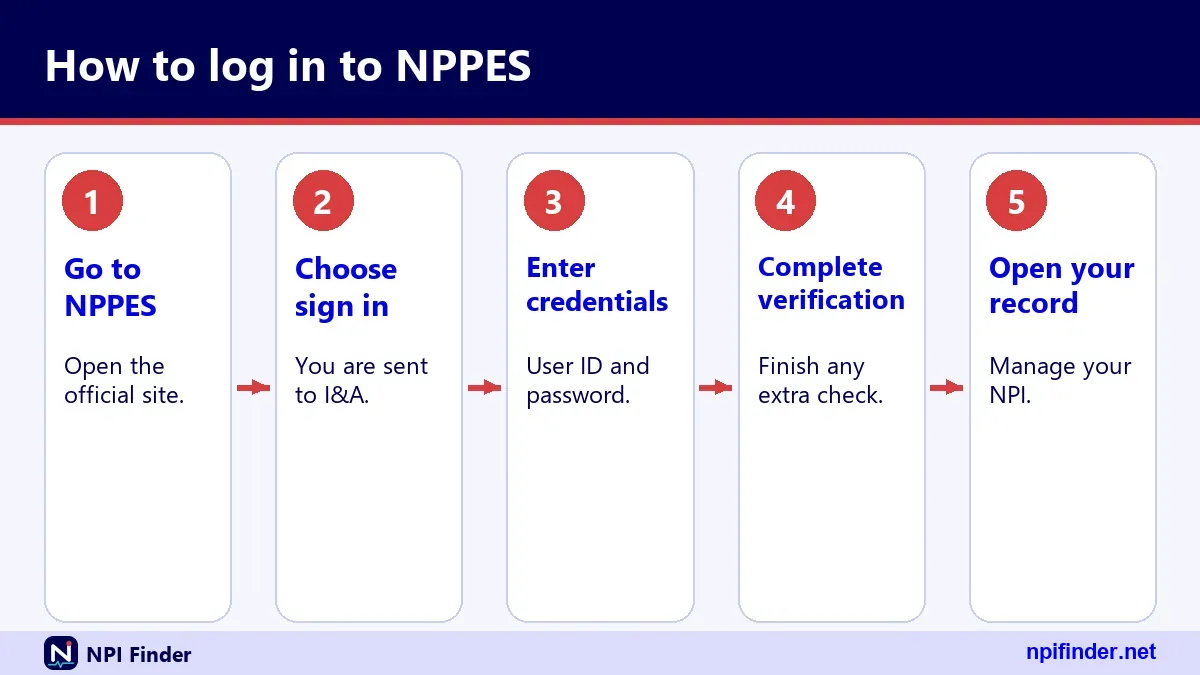
You can sign in to NPPES in a few minutes if your I&A account is already active. Follow these steps from a desktop or laptop browser.
- Open nppes.cms.hhs.gov by typing it into your address bar yourself.
- Choose the sign-in option to reach the I&A Sign In page.
- Enter your User ID and password.
- Complete the multi-factor authentication step using the method you registered.
- Open the NPPES application from your account home and select your NPI record.
Tip: Type the address yourself instead of clicking a search ad. Lookalike sites exist, and CMS lists no fee for any NPPES task.
What the Sign In page asks for
The Sign In page asks for your User ID and your password. After that, the system prompts for a second factor. The I&A FAQ says MFA has been required for I&A login since April 21, 2022. The page also carries the links you need when something goes wrong: Forgot Password and Retrieve Forgotten User ID. Know where those links are before you need them.
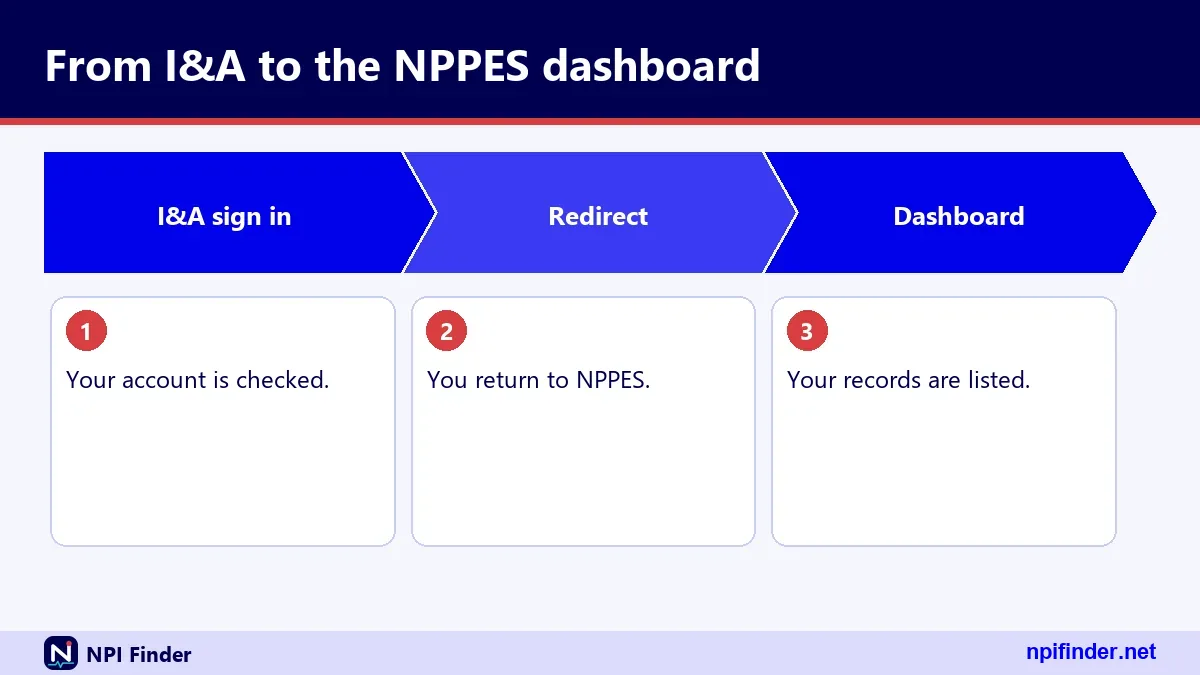
What happens right after you sign in
Once you pass MFA, you land in your I&A account, and from there you open NPPES. You can see and change the data tied to your NPI. Changes you save in NPPES do not update your Medicare enrollment. That lives in PECOS and needs its own update, a point the CMS NPI Fact Sheet makes clearly. Update or Deactivate an NPI covers the edit side.
NPPES log in: the Sign In page and its links
The NPPES log in runs through the I&A Sign In page, which carries every recovery link you will need. The two that matter most are Forgot Password and Retrieve Forgotten User ID. The site is a single-page JavaScript app, so it can look blank for a moment while it loads. Wait a few seconds before you refresh. Searchers who type "nppes sign in" or "nppes portal" are looking for this same page.
Why nppes.cms.hhs.gov/login may not behave as expected
People often type nppes.cms.hhs.gov/login or paste a long address starting with https. The site is a JavaScript app, so deep links can fail or bounce you to the front page. Open the main address, nppes.cms.hhs.gov, and use the sign-in option from there. That route works regardless of which variation you remember. If a bookmark breaks, delete it and save a fresh one.
NPPES logins: one person, one account
You should have one I&A account, and it should be yours alone. The I&A FAQ notes that an account matching an existing Social Security number means you already hold an I&A or NPPES account. That is why "nppes logins" in the plural is a trap. Creating a second account does not help you; it just creates confusion. If you cannot recall your first account, use the recovery tools or call the help desk.
Why sharing a login causes trouble
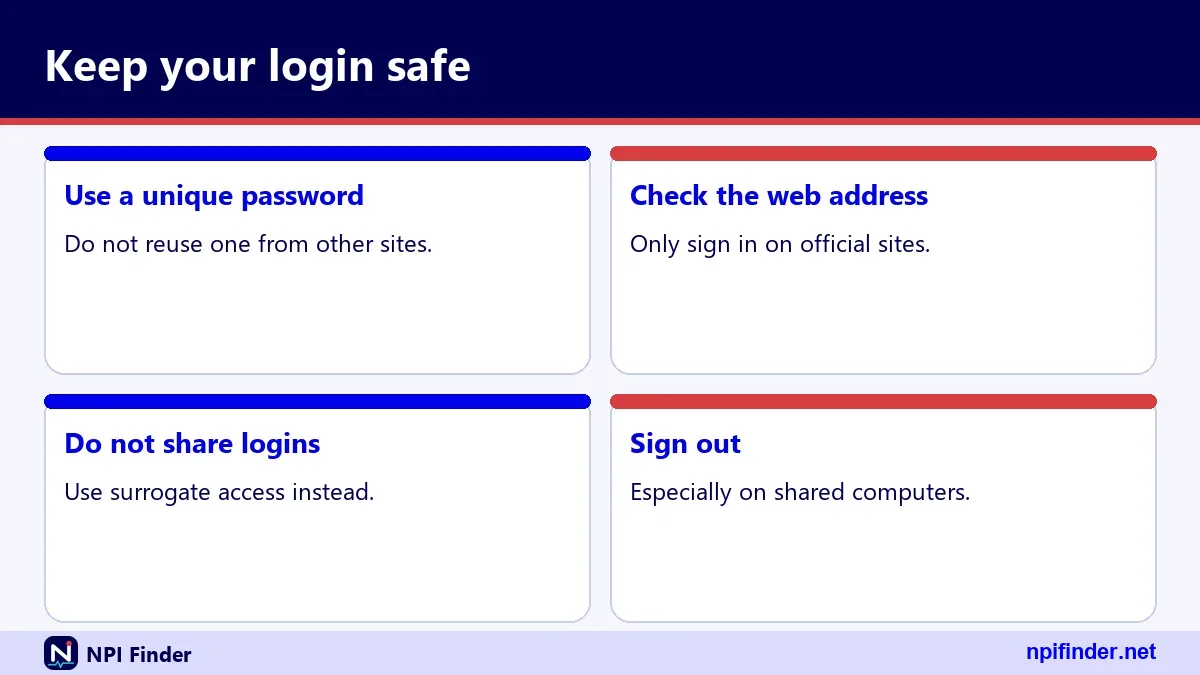
A shared User ID makes every change anonymous. If a wrong address goes in, nobody can say who entered it. MFA also breaks down, because the code goes to one person's phone or inbox. Multiple staff members sharing one phone number is a common cause of lockouts. If your office handles many providers, ask your organization about an access arrangement that fits your compliance rules instead of passing one password around.
National provider identifier login: who needs an account
Anyone who wants to apply for, change or deactivate an NPI online needs an I&A account. That group includes physicians, nurse practitioners, dentists, pharmacists and other individual providers. It also includes people who manage records for organizations, such as hospitals and group practices. Covered providers must report changes to NPPES data within 30 days, under 45 CFR 162.410(a). The login is how you meet that duty online. Apply for an NPI explains the first-time route.
Individual providers (Type 1)
An individual provider gets one NPI, called a Type 1 NPI. The I&A account that edits it is tied to you as a person. The form asks for your name, SSN or ITIN, and date of birth. CMS says SSN, ITIN and date of birth are not made public. Your login lets you keep the public parts of your record accurate.
Organizations (Type 2)
An organization can hold more than one NPI, and it names an authorized official. The NPPES record for an organization shows that official's name, title and phone number. Whoever signs in for the organization should be someone the organization has cleared for that job. Hospital units may also have their own NPIs as subparts, if their identifying data is unique.
Patients and researchers
You do not need a login. Patients checking a doctor and researchers pulling provider data can use the public registry or the downloadable files. The NPI Database & Download page covers the file route. An NPPES account is for people who manage a record, not for people who read one.
I&A login for NPPES, PECOS, PEPPER and CBR
One I&A User ID and password can open four CMS systems, based on the I&A FAQ. That is useful, and it is also why a password problem in one place becomes a problem everywhere. A reset in I&A changes access for all of them at once. Plan for that when you reset a password. Tell the colleagues and systems that depend on your access before you change it.
CMS I&A login: first-time registration
Registering with CMS I&A is the first step if you have never held an NPPES account. You create a User ID, set a password and choose security questions. You then add MFA. The system matches your details against your Social Security number, so an existing account will surface at this point. If you search for "cms i&a login", "cms i and a login" or "i&a cms", this is the process you want. The steps appear below under the account-creation guide.
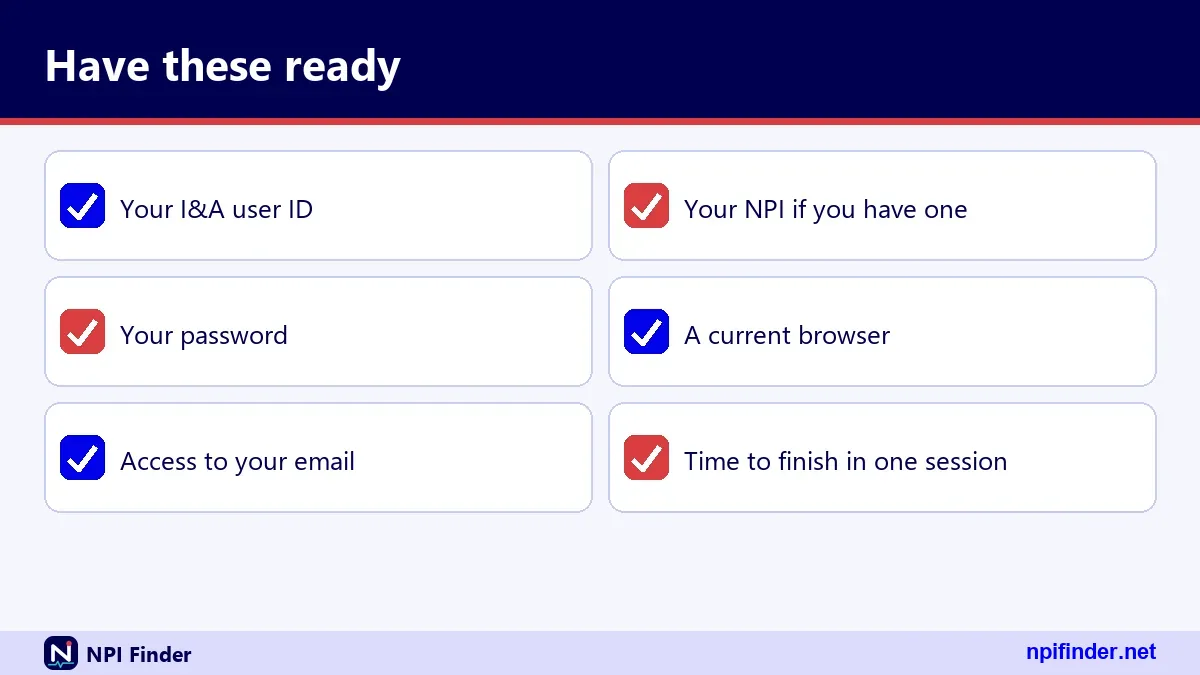
Information to have ready
Gather your legal name, your SSN or ITIN, your date of birth and a working email address. CMS ties account recovery to a unique email on the account, so use one only you can read. Have a phone nearby for MFA. If you already know your NPI, keep it close, because it helps you locate your record after you sign in.
Registering when you already have an NPI
Having an NPI does not mean you have an I&A account. An NPI may have been assigned through a paper form, or a staff member may have applied for you. If so, you can still register for I&A and then connect to your record. If the system says your SSN already matches an account, stop and use the recovery tools instead.
Identity and access management NPPES: what I&A actually verifies
Identity and access management in NPPES means the system confirms you are you before it lets you edit a record. I&A checks your credentials, your security answers and your MFA factor. It does not check your license, your credentials or your Medicare status. CMS is explicit that an NPI does not ensure a provider is licensed or credentialed. Signing in proves identity, not qualification.
What a successful login does not prove
A working login says nothing about whether you are enrolled in Medicare. It does not mean your PECOS record is current. It does not mean a health plan has credentialed you. NPPES and PECOS are separate systems that share one account system. Keep that line clear when you tell a colleague that "the login works, so we are enrolled."
NPI username and password: what they are and where they come from
Your User ID and password come from I&A, not from your NPI. You create the User ID when you register. You choose and later reset the password. People search "npi user id and password", "npi login and password" and "npi username lookup" as if the NPI doubled as a login. It does not. Your NPI is public. Your password must stay private.
Password expiry every 60 days
I&A passwords expire every 60 days, according to the I&A FAQ. Expiry only blocks your login until you reset the password. It does not change your NPI, your Medicare enrollment or your payments. Many people panic when a prompt says the password has expired. Stay calm and use the reset flow. The fix takes minutes, and nothing about your NPI is at risk.
Looking up a lost password or username
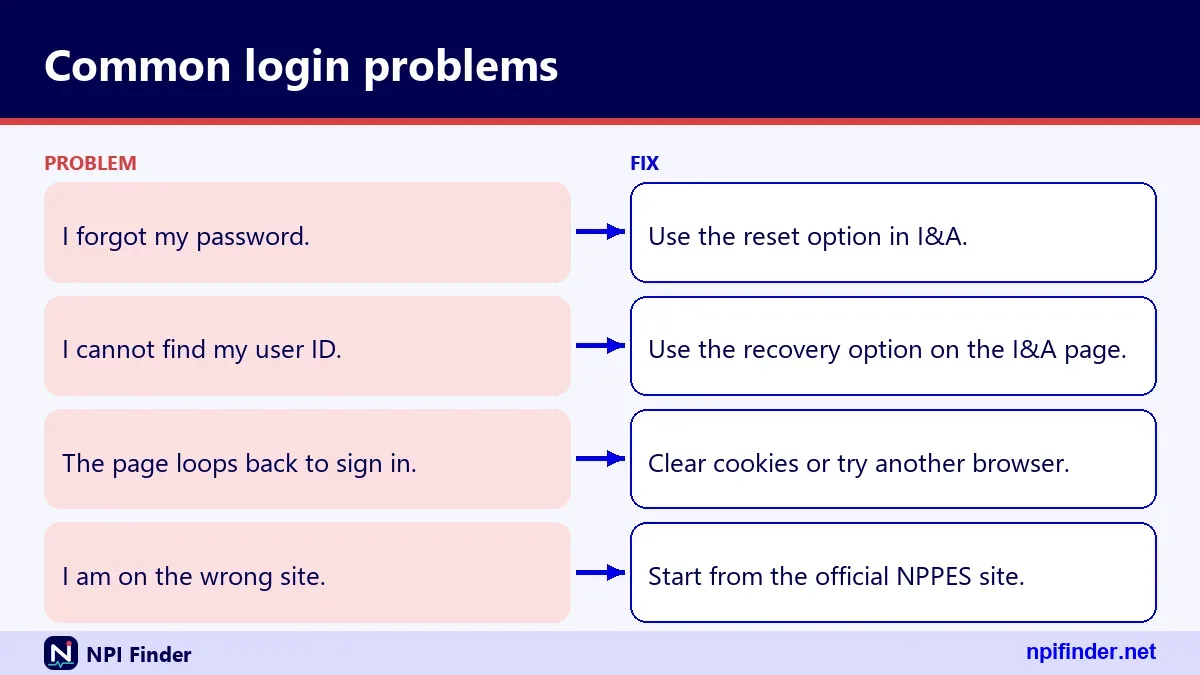
There is no public lookup for a password or User ID, and searches such as "npi password lookup" lead nowhere useful. You recover credentials by using the Forgot Password and Retrieve Forgotten User ID links on the Sign In page. If those fail, contact the External User Services help desk. Nobody at CMS can read your password back to you.
Multi-factor authentication at the NPPES login
MFA is required for I&A login and has been since April 21, 2022. You need only one method, but the I&A FAQ recommends setting up two, such as email and text message. Voice call is also listed. A second method saves you when your phone dies or your number changes. You can reset your MFA methods after you log in to I&A, so manage them before you need them.

Choosing your two methods
Pick methods that fail in different ways. A text message and an email address is a good pair, because losing a phone does not lose your inbox. Avoid two methods that rely on the same device. Whether an authenticator app is supported is not something I could confirm from CMS material, so check the MFA setup screen for the options it offers.
Updating MFA when your phone number changes
Log in while the old method still works, then change the method in your I&A account. Do this before you port a number or switch carriers. If you wait until the old number is dead, you may be unable to sign in at all. In that case you will need help from the External User Services help desk, listed later on this page.
How to create an I&A account for NPPES access
You can set up access in about the time it takes to answer a few security questions. These steps follow the general flow described in the I&A material.
- Go to nppes.cms.hhs.gov and choose the option to register or create an account.
- Enter your name, date of birth, SSN or ITIN and the other personal details requested.
- Provide a unique email address that only you can read.
- Choose a User ID, create a password and set your security questions.
- Register at least one MFA method, and add a second if you can.
- Sign in and open NPPES to find or create your NPI record.
Warning: If the system says your SSN already matches an account, do not create another. Use Forgot Password or Retrieve Forgotten User ID instead.
What to do if registration stalls
Stalls usually come from a mismatch between what you typed and what the system holds. Check for typos in your name and date of birth. Try again once, slowly. If it fails twice, stop and call the help desk instead of retrying. Repeated attempts can trigger a lock, and a lock turns a ten-minute task into a longer one.
How to reset a forgotten NPPES password
You can reset a forgotten password from the Sign In page without calling anyone. These steps follow the I&A FAQ.
- Open the I&A Sign In page and choose Forgot Password.
- Enter your User ID when asked.
- Answer your three security questions, or provide the user information tied to the account.
- Create a new password that you have not used before.
- Sign in with the new password and complete MFA.
Tip: Answer the security questions exactly as you set them. Capital letters, spacing and abbreviations can matter.
If the security questions fail
The I&A FAQ says three failed attempts at the user information step mean you must contact the External User Services help desk. Do not keep guessing. Have your name, email and NPI ready when you call. The agent can verify your identity through other routes that the website cannot offer.
If the reset email never arrives
Check the spam folder first. Then confirm you are looking at the inbox tied to the account, not an old work address. Wait a few minutes before you retry. If the message still does not arrive, the email on file may be wrong. That is a help-desk issue, not something you can fix from the Sign In page.
How to retrieve a forgotten User ID
You can retrieve a forgotten User ID from the Sign In page using the Retrieve Forgotten User ID link. The process works best if you have a unique email on the account. The I&A FAQ adds one catch: if you retrieve your User ID without using the email route, you must also change your password. Plan for that extra step so it does not surprise you.
When your email is not on the account
If the account has no unique email, the system asks for other required user information instead. Supply it exactly as registered. Because the I&A FAQ says you must change your password in this case, set aside a few extra minutes. Write the User ID somewhere safe once you have it back.
Searching "npi username lookup" will not help
Search engines cannot find your User ID, because it is private account data. Ignore any site that claims to look it up for a fee. The only legitimate routes are the Retrieve Forgotten User ID link and the External User Services help desk. If a site asks for your SSN, close it.
Unlocking a locked I&A account
Three failed login attempts lock your I&A account, and you unlock it through Forgot Password. That is the rule from the I&A FAQ. You do not need to wait or call anyone for a simple lock. Use the same reset steps shown earlier. Once you set a new password, sign in with it and finish MFA. Take care to type slowly on the next attempt.
When unlocking does not work
If the reset flow itself fails, the External User Services help desk is the next stop. Call 1-866-484-8049, or use TTY/TDD at 1-866-523-4759. You can also write to [email protected] or use the help desk site at eus.custhelp.com. Hours are not stated in the I&A FAQ, so I cannot give them here.
Contacting the External User Services help desk
The External User Services (EUS) help desk handles problems with I&A, NPPES and PECOS accounts. Reach it by phone at 1-866-484-8049, by TTY/TDD at 1-866-523-4759, by email at [email protected] or through eus.custhelp.com. These details come from the I&A FAQ dated January 20, 2026. The FAQ does not list opening hours, so check the help desk site before you call.
What to have ready before you call
Have your full legal name, your email on file, your User ID if you remember it, and your NPI. Write down what you tried and what message appeared. Agents move faster when you say "the reset email never arrived" than when you say "it does not work." Take notes on the ticket number or the agent's name.
Calling the NPI Enumerator for NPPES record questions
The NPI Enumerator answers questions about applications and NPI records, and it is a different team from the I&A help desk. Call 1-800-465-3203 or use TTY at 1-800-692-2326. You can also write to [email protected]. Hours are not published on the CMS page I used. If the problem is the sign-in itself, start with the EUS help desk instead.
Which team answers which question
Use this simple split. Account, password, User ID and MFA problems go to EUS. Questions about the content of an application, a deactivation or a paper form go to the Enumerator. If you reach the wrong team, they will usually redirect you, but you lose time. When in doubt, ask yourself whether the issue is "getting in" or "what is inside."
NPHS login and other misspellings people search
NPHS login is not a CMS system I can verify, and it looks like a mistyped version of NPPES. The same goes for "npps login", "nepps login", "nppess login" and "npt login". Searchers drop or swap letters in NPPES all the time. The safe response is the same each time: go to nppes.cms.hhs.gov and ignore any other address that a search result offers you.
RNP login and NPUSER login
I found nothing in the verified CMS sources about a system called "rnp" or "npuser." I cannot tell you what those searches are meant to reach. If you came here from one of them, assume you want NPPES or the I&A system, and start from nppes.cms.hhs.gov. If your employer gave you a different portal name, ask your employer.
NPPES provider login and NPI provider login: the same door
"NPPES provider login", "NPI provider login", "provider NPI login" and "npi login for providers" all describe one sign-in. CMS does not run separate provider and staff versions of the NPPES page. Your role shows up in what you can do after you authenticate, not in which URL you pick. That makes the first step simple: one address, one Sign In page, one set of credentials per person.
NPI login for providers who are new to NPPES
New providers often assume the NPI arrives with a login. It does not always. If someone else applied on your behalf, or you applied on paper, you may need to register for I&A yourself. After that, you can sign in and review the record. Apply for an NPI shows how new applications work.
Provider login after a name or address change
If your name or address has changed, update NPPES within 30 days, as 45 CFR 162.410(a) requires of covered providers. Sign in, edit the record and save. Also update PECOS separately, because NPPES changes do not reach Medicare enrollment on their own. Keep a note of the date you made each change.
Login NPI: what to type and what to skip
The phrase "login npi" is just a reordered "npi login", and the answer does not change. Skip any page that asks you to enter your NPI as a password. Skip any page that asks for payment. The real sign-in asks for a User ID, a password and an MFA code. If you also see a fee request, you have left the CMS site.
NPI login lookup and NPI lookup login
Searchers who type "npi login lookup" or "npi lookup sign in" usually want to find an NPI, not sign in. That is a registry task. Use the public NPI Registry for it, or the search tool on this site. You do not need an account. The page Find My NPI Number explains the options for finding your own number.
CMS provider login: what it covers and what it does not
There is no single CMS provider login that opens every CMS system. Different systems have different front doors. NPPES, PECOS, PEPPER and CBR share I&A. Others, such as Medicare contractor portals, have their own accounts. Searches like "cms login provider", "cms gov provider login", "cms login for providers" and "cms hhs gov login" all land in this tangle. Work out which system you need first.
CMS login provider portal versus CMS Medicare provider portal
"CMS login provider portal" and "cms medicare provider portal" describe different things depending on who types them. A biller usually means a Medicare contractor portal. A credentialer usually means PECOS. A provider updating an address usually means NPPES. State your task before you pick a door. The access paths table later on this page maps tasks to systems.
Medicare NGS provider portal and NGS Connex
The Medicare NGS provider portal is a separate contractor system, not part of NPPES. I could not verify its login steps from CMS sources, so I will not describe them. Searches such as "ngs connex log in", "ngsp portal", "medicare ngs provider login" and "nsg connex login" belong in this group. Use the instructions your Medicare Administrative Contractor gives you for that portal.
Why an NPPES password will not work there
Your I&A User ID covers NPPES, PECOS, PEPPER and CBR. That list does not include contractor portals, so do not expect the same credentials to open them. A failed login on a contractor portal says nothing about the health of your I&A account. Test the two separately before you start resetting passwords.
Finding your Medicare Administrative Contractor
CMS points providers to a "Find your enrollment contractor" PDF through its PECOS page. Use it to identify your MAC and its contact path. I did not verify any specific MAC phone numbers, so I list none. Ask your MAC which portal fits your billing questions, and which credentials it expects.
Medicare I&A login and I&A Medicare login
"Medicare I&A" and "i&a medicare login" refer to the same I&A system described above. It is used for Medicare enrollment in PECOS as well as for NPPES. If you want to change Medicare enrollment, your I&A login leads you to PECOS. The page PECOS Login covers that side. Do not confuse the two jobs, because each one updates a different record.
I&A system, I&A cms login and nppes i and a
All of these phrases name the same account layer. You do not need separate accounts for each phrase. One User ID and one password, protected by MFA, is the whole arrangement. If a site offers a different "I&A" that asks for payment, close it. CMS lists no fee to use I&A, to apply for an NPI, or to search the registry.
Using I&A to reach PECOS
After you sign in to I&A, you can move to PECOS if your role requires it. PECOS is the Medicare enrollment system, and its login is hosted at pecos.cms.hhs.gov. Use the official CMS PECOS page to confirm the current path. Enrollment uses CMS-855 forms, and revalidation runs every five years for most providers. See PECOS Lookup & Revalidation for the cycle.
Dormant I&A accounts: 180 days and 365 days
An I&A account you have not used for a long time can stop working. The I&A FAQ gives two thresholds. If you used the account within 365 days but not within the last 180, you must reset your password. If you have not used it for 365 days or more, you must re-verify your information and create a new User ID. That is a bigger job, so sign in occasionally even when you have nothing to change.
Rebuilding an account after 365 days
Expect to re-verify your identity and choose a fresh User ID. Gather the same details you used at first registration. Your NPI does not change during this process, because the NPI itself does not expire. Only your access changes. Budget extra time, and tell your team if the NPPES record is due for an update.
Old PECOS and EHR Incentive Program accounts: do they still work?
Yes, an older account still works. The I&A FAQ says you can sign in with your previous NPPES or PECOS User ID and password. CMS converted all existing accounts used for PECOS and the EHR Incentive Program. Individual providers' NPPES User IDs were converted too. You do not need a second account. If you are unsure whether you have one, use the Forgot User ID or Forgot Password link. The PECOS Login page covers the enrollment side.
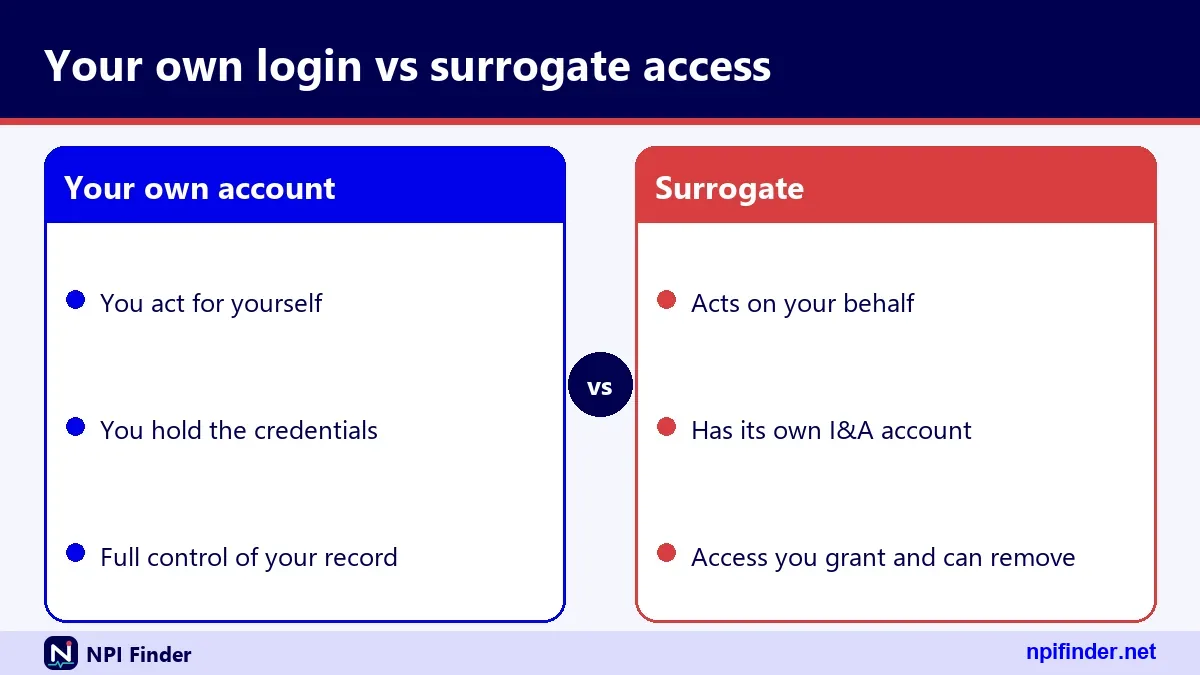
Who can sign in for a provider: Authorized Official, Access Manager and Staff End User
An employer's Authorized Official controls who may act for a provider in I&A. The I&A FAQ defines this person as a legal signatory of the organization. The Authorized Official approves Access Managers, and both can manage staff and surrogacy requests. A Staff End User gets access only when one of them grants it. Billing staff therefore need their own I&A account and an approved connection. They should never borrow yours. If you need to correct a record afterward, see Update or Deactivate an NPI.
NPPES login for people who have an NPI but never used NPPES
Holding an NPI does not guarantee you hold an NPPES login. Your NPI might have come from a paper form, from a staff member's online application or from an organization that enumerated you in bulk. CMS lists three routes to an NPI: the web application, the paper form CMS-10114 and Electronic File Interchange. Only the web route naturally gives you an I&A account.
If you do not remember who applied for you
Search the public registry for your name and state. The record shows your NPI, status and enumeration date. Then register for I&A, sign in and review what is stored. If the record looks wrong, correct it within 30 days of finding the error, since that is the reporting window for covered providers.
QPP HARP, QSEP and other CMS sign-ins that are not NPPES
Several other CMS systems sound similar to NPPES but use their own sign-ins. "QPP HARP login" and "qsep cms gov login" are examples. I could not verify how either system handles accounts, so I will not claim that one login covers them. If a task came from the Quality Payment Program, start at the program's own help channel. NPPES is only for NPI records.
Why an NPI record does not unlock quality programs
An NPI identifies you in many CMS programs, but it is only an identifier. It does not enroll you in any program. The CMS NPI Fact Sheet says an NPI does not guarantee payment and does not enroll a provider in a health plan. Each program has its own onboarding. Check what the program asks for, and which login it uses.
Care Compare and public provider data
Medicare Care Compare is a public finder, and you do not sign in to read it. CMS states that its provider information comes mainly from PECOS. CMS says clinicians can suppress a listed address through PECOS or the QPP Service Center, and that route is separate from NPPES. See Find a Medicare Provider for how those listings work.
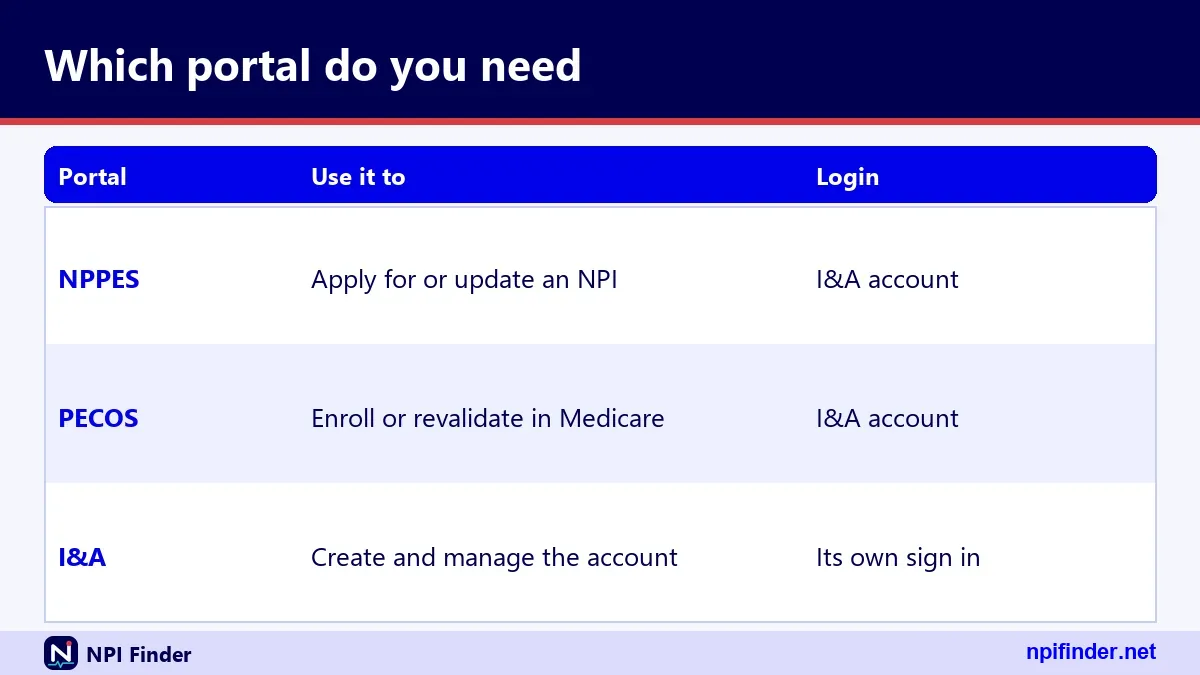
Access paths table: which system opens for which task
Pick the system by the job you need done, not by the word "login." This table maps common tasks to the right door.
| Task | System | Account needed | Where it lives |
|---|---|---|---|
| Look up any provider's NPI | NPI Registry | None | npiregistry.cms.hhs.gov |
| Edit your own NPI record | NPPES | I&A User ID and password with MFA | nppes.cms.hhs.gov |
| Apply for a new NPI online | NPPES | I&A account | nppes.cms.hhs.gov |
| Enroll or revalidate in Medicare | PECOS | I&A account | pecos.cms.hhs.gov |
| Download all NPI data | NPPES data files | None | download.cms.gov/nppes |
| Check a doctor's Medicare listing | Care Compare | None | medicare.gov/care-compare |
So, NPPES is the best system for editing your own NPI record because it stores that record and opens only with your I&A User ID, password and MFA.
NPPES login versus PECOS login: two records, two updates
NPPES stores your NPI record, while PECOS stores your Medicare enrollment, and you must update each one separately. The CMS NPI Fact Sheet states that updating NPPES does not automatically update Medicare enrollment. Both can use the same I&A account, which makes it easy to forget that two records exist. A change of address, for example, usually means two edits. See the PECOS Login page for the enrollment side.

What each record controls
NPPES controls the public NPI Registry listing. PECOS controls your Medicare enrollment details, such as practice locations and reassignments. A mismatch between them can confuse billing staff and credentialers. When you change an address, update both. Then check the public registry a day or two later to confirm the new data appears.
Same credentials, different consequences
One I&A password opens both systems. A reset affects both. A lockout blocks both. The consequences of an error, however, differ. A wrong address in NPPES is public. A wrong reassignment in PECOS can delay Medicare payments. Slow down on the PECOS side. Read each screen twice before you submit.
Online login versus paper form versus calling for help
The online route is fastest for updates, but it requires a working login. CMS says the web application gives the fastest processing and that paper takes longer. When the login fails and you cannot fix it, paper form CMS-10114 or a call to the Enumerator becomes the fallback. Here is how the three compare.
| Route | Best for | Needs login | Speed according to CMS |
|---|---|---|---|
| NPPES web application | Updates, new applications | Yes | Fastest |
| Paper form CMS-10114 | When you cannot sign in at all | No | Slower |
| Call or email the Enumerator | Questions about a record | No | Depends on the issue |
So, the NPPES web application is the best route for updates and new applications because CMS says it gives the fastest processing.
When paper is the right call
Use paper if you have exhausted the reset tools and the help desk cannot restore access in time. CMS gives no processing-time figure, so do not promise a date to anyone. Mail the form to the Enumerator at the Baltimore address, and keep a copy. Meanwhile, keep trying to fix the login, because the web route remains quicker.
When a phone call beats both
If you are unsure what to change, call first. The Enumerator can tell you which fields matter before you file anything. That saves a rejected form. Be ready to explain what you are changing and why. A short call can spare you a second round of paperwork.
Choosing the right help channel: EUS, Enumerator or your MAC
Choose the help channel by the type of problem. Sign-in and account problems go to EUS. NPI record and application questions go to the Enumerator. Medicare billing portal problems go to your MAC. The table below puts the choice in one place.
| Problem | Contact | How |
|---|---|---|
| Locked account, lost User ID, MFA failure | EUS help desk | 1-866-484-8049, [email protected], eus.custhelp.com |
| Application, update or deactivation question | NPI Enumerator | 1-800-465-3203, [email protected] |
| Contractor portal or Medicare enrollment | Your MAC | Use your contractor's published contacts |
So, the EUS help desk is the best channel for locked accounts, lost User IDs and MFA failures because the Enumerator cannot reset your MFA.
The cost of choosing wrong
A wrong choice rarely causes harm, but it wastes time. The EUS team cannot edit your NPI data. The Enumerator cannot reset your MFA. Neither can resolve a contractor portal issue. Spend ten seconds working out which problem you have. That pays back the first time you avoid a transfer.
Troubleshooting an NPPES login that will not work
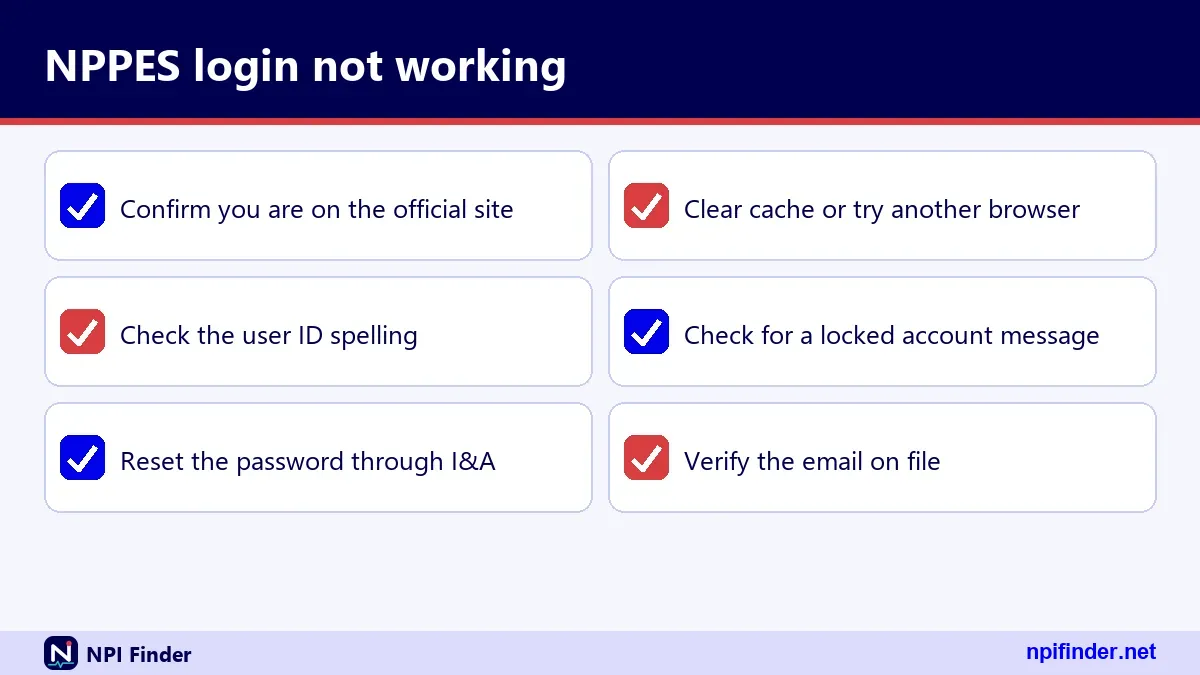
Most failed NPPES logins trace to one of five causes: an expired password, a locked account, a lost MFA method, a stale browser entry or a wrong site. Work through them in that order. The table below gives the symptom and the first fix.
| Symptom | Likely cause | First fix |
|---|---|---|
| Password rejected after months away | 60-day expiry | Forgot Password flow |
| Account will not accept any password | Three failed attempts, lock | Forgot Password to unlock |
| Code never arrives | Wrong or lost MFA method | Use second method or call EUS |
| Page blank or spinning | Single-page app still loading, or browser cache | Wait, then clear cache |
| User ID not recognized | Wrong User ID or dormant 365+ days | Retrieve Forgotten User ID |
Start with the simplest check
Confirm you are on nppes.cms.hhs.gov and not on a lookalike. Confirm caps lock is off. Type the password into a plain text field and paste it in if you can. Many failures end here. Only after these checks should you reset anything, because a reset changes access for every system that uses I&A.
Work down the list in order
Try one fix at a time and note the result. Changing three things at once leaves you guessing what worked. If the second fix fails, move to the third. Stop after the fifth and call the help desk. By then you will have a clear story to tell, which makes the call much shorter.
Password problems at the NPPES login
Password problems come from expiry, typos and stale saved entries. The I&A FAQ says passwords expire every 60 days, and that expiry affects nothing except your ability to sign in. If a password was working last quarter and fails today, expiry is the first suspect. Use Forgot Password. You should be back in within minutes.
"My password worked last month"
A password that worked last month probably aged out. At 60 days, it expires. Your NPI, enrollment and payments are unaffected. Reset it, choose a new one and update your password manager. If you rely on a saved browser entry, delete the old one so the browser does not keep offering it.
"The system says my new password is not allowed"
I could not verify the exact password rules from the CMS material I used, so I will not list them. Try a longer passphrase with a mix of character types. Avoid anything resembling a previous password. If the form still rejects it, read the on-screen rule text, which spells out what is missing.
"I am locked out after typing my password wrong"
Three failed attempts lock the account. Use Forgot Password to unlock it. Do not wait for the lock to clear on its own, because the FAQ describes the reset flow as the route. After unlocking, sign in once slowly with the new password to confirm it sticks.
MFA problems at the NPPES login
MFA problems come from changed numbers, missed messages and a single method with no backup. The I&A FAQ says you need only one method and recommends two. If your one method fails, you cannot sign in until you fix it. So set up two methods now, while everything works.
The text message does not arrive
Check signal and the number on file. Confirm your carrier is not filtering short codes. If you have a second method such as email, switch to it. Once inside, correct the phone number in your account. If you have no second method, call the EUS help desk.
The email code lands in spam
Look in junk and promotions folders. Add the sender to your safe list once you find it. If you use a work email with strict filters, ask your IT team to allow messages from the CMS senders. Do this before you need an urgent sign-in.
You lost the phone you used for MFA
Use another method if you registered one. Then replace the lost method in your I&A account. The FAQ states that you can reset MFA methods by logging in to I&A. If you cannot log in at all, call EUS. Expect identity checks before they change anything.
Account and identity problems at the NPPES login
Account problems arise when the system cannot match you to a record or finds a record already in your name. The I&A FAQ says that an account matching an existing SSN means you already hold an I&A or NPPES account. In that case, recover the old account instead of creating a new one.
"An account already exists with this SSN"
That message tells you the account exists. You may have registered years ago and forgotten. Use Retrieve Forgotten User ID, then Forgot Password. If neither route works, call EUS. Do not try to register again with a slightly different spelling, which can create a messy duplicate.
Your name changed
A name change can make identity matching harder. Sign in with the old credentials if they still work, and update the name in your account and in NPPES. Report the change within 30 days. If the sign-in fails, tell EUS about the change so they can verify you correctly.
Your NPI cannot be found after you sign in
Search the public registry by name and state to confirm that the NPI exists. If it does, the problem lies in linking your account to the record. If the registry shows nothing, you may not have an NPI yet. Then Apply for an NPI is the right next step.
Browser and page problems at the NPPES login
Most page problems come from the site being a JavaScript application that loads slowly or caches badly. NPPES is a single-page app, so it needs a few seconds to draw. Wait first. Then try a refresh, then a different browser. CMS publishes no browser support list that I could verify, so these are general fixes rather than official rules.
The page stays blank
Wait ten to fifteen seconds. Then refresh once. If it remains blank, open a private window, which loads the site without old cached files. If that works, clear the cache in your normal window. If it does not, try another browser or another network.
Old bookmarks and deep links
A saved deep link can fail if the site changed. Delete it and save the main address, nppes.cms.hhs.gov. Use the sign-in option from there. That avoids the confusion behind searches for "npi login page", "npi login site" and "nppes login page." A fresh bookmark is a two-second fix.
The 30-day rule and why your NPPES login matters
Covered providers must report changes to their NPPES data within 30 days of the change. That duty comes from 45 CFR 162.410(a)(4) and is repeated in the CMS NPI Fact Sheet. A working login is how you meet it online. A broken one is not an excuse to wait. If you cannot sign in, use the help channels or the paper form. Do not let the window lapse.
What counts as a change
Address changes, phone changes, name changes, new license numbers and new taxonomy codes all count. So does a deactivation event. The form lists reasons for deactivation as death, business dissolved or other. If your practice moved or your name changed, the clock starts that day. Write the date down.
Who the rule binds
The duty falls on covered health care providers, meaning those who transmit health information electronically in connection with a HIPAA standard transaction. Non-covered providers may hold an NPI without the same duty. Organizational providers must require their non-covered prescribers to obtain an NPI and disclose it. If you are unsure which group you fall into, ask your compliance officer.
What the NPPES login costs
CMS lists no fee for getting an NPI, for using the NPI Registry or for downloading the NPI files. The registry and download pages state there is no charge. CMS also said in a 2006 message that applying online is free. I could not find a current CMS page that uses the exact words "NPI is free," so I describe it as "no fee listed." Anyone charging you is not CMS.
Paying a third party
Some private services charge to "file your NPI" or "unlock your account." CMS does not require them, and the application is at nppes.cms.hhs.gov. A fee does not speed anything up. If you do hire an agency for credentialing work, make sure they use your own I&A account properly and never keep your passwords.
Official sources for NPPES login questions
The most reliable sources are the CMS NPI page, the I&A FAQ and the NPPES site itself. The I&A FAQ is a PDF on the NPPES site, dated January 20, 2026. The CMS NPI page was last modified August 14, 2026. The regulation lives at 45 CFR Part 162, Subpart D. Use these over blog posts, forum answers and this page when they disagree.
Where CMS explains the NPI itself
The CMS NPI page and the NPI Fact Sheet explain what an NPI is, who needs one and how to apply. The fact sheet is dated December 2024. For the legal text, read the eCFR version of 45 CFR Part 162. For definitions without legal language, see NPI vs Other Provider IDs.
How to check that a page is official
Look at the domain. CMS sites end in cms.hhs.gov or cms.gov. Registry and NPPES pages sit on subdomains of cms.hhs.gov. A site with a similar name and a different ending is not official. When you are unsure, start from the CMS NPI page and follow its links.
What is public once you have an NPPES record
Much of what you store in NPPES becomes public in the NPI Registry. CMS says registry data is disclosed under the Freedom of Information Act. The public fields include your NPI, entity type, name, credential, sole proprietor flag, status, dates, addresses, phone numbers, taxonomies with license numbers, other names and endpoints. SSN, ITIN and date of birth are not made available on the internet.
The record structure you will see
The registry's full response groups data into basic, addresses, practice locations, taxonomies, identifiers, other names and endpoints. Basic holds the name, credential, status and dates. Addresses split into location and mailing. Taxonomies carry a code, a description, a primary flag, a state and a license number. Look at your own record this way before you edit it.
Deactivated records
For a deactivated NPI, CMS discloses only the NPI and the deactivation date. CMS does not reassign a deactivated NPI to another provider. If you need to deactivate or reactivate, read Update or Deactivate an NPI first. The paper form has boxes for each action.
Scams and lookalike NPPES login pages
Fake NPI sites exist, and the best defense is to type the CMS address yourself. I found no current CMS fraud alert about NPI-for-fee sites, so I will not claim one exists. But CMS lists no fee for any NPPES task. A site that asks for payment to "register" or "unlock" is not the CMS system.
Red flags on a login page
Watch for a domain that does not end in hhs.gov, a request for your NPI as a password, a request for a credit card and urgent language about suspension. The real flow asks for a User ID, a password and an MFA code. Never share an MFA code with anyone who contacts you first.
What to do if you entered credentials on a fake site
Change your I&A password right away from the real site. Reset your MFA methods. Contact the EUS help desk and tell them what happened. Review your NPPES record for changes you did not make. If you reused that password anywhere else, change it there too.
Login terms explained in a glossary table
These short definitions cover the words that show up around the NPPES sign-in.
| Term | Meaning |
|---|---|
| NPPES | National Plan and Provider Enumeration System, the CMS system that assigns and stores NPIs |
| I&A | Identity and Access Management, the account system behind the NPPES sign-in |
| MFA | Multi-factor authentication, a second proof of identity at sign-in |
| EUS | External User Services, the help desk for I&A, NPPES and PECOS accounts |
| NPI Enumerator | The contractor team that handles NPI applications and record questions |
| PECOS | Provider Enrollment, Chain and Ownership System, the Medicare enrollment system |
| MAC | Medicare Administrative Contractor, which handles enrollment for its region |
| Type 1 / Type 2 | Individual provider NPI and organization NPI |
Terms people confuse
"NPI" is the number. "NPPES" is the system. "I&A" is the account. "Registry" is the public search. Each has its own role. When you speak to a help desk, name the one you mean. "I can't log in to I&A" and "my NPI is wrong" start two very different conversations.
Myths and facts about NPI logins
The most common myth is that the NPI itself is a login. It is not. Another is that an expired password harms your enrollment. It does not. The table below sorts a few more.
| Myth | Fact |
|---|---|
| Your NPI number is your password | Your User ID and password come from I&A |
| An expired password affects Medicare payments | It only blocks sign-in until reset |
| You need an account to search the registry | The registry search is public |
| An NPI proves you are licensed | CMS says it does not ensure licensure or credentialing |
| Updating NPPES updates PECOS | They are separate and need separate updates |
| Any CMS login opens every CMS system | I&A covers NPPES, PECOS, PEPPER and CBR only |
After you sign in: using what you see to fix your record
Your first sign-in is a good time to audit your record against the public registry. Pull up your record in the registry and compare it with what NPPES shows. Look for wrong addresses, old phone numbers and outdated taxonomies. Fix them, and save. For help picking codes, try Taxonomy Code Lookup. To test a number's format, use the NPI Number Validator.
Taxonomy and license fields
Each taxonomy entry has a code, a description, a primary flag, a state and a license number. For example, 207Q00000X is Family Medicine in the NUCC code set. Make sure the code matches your real specialty and your license state. NUCC releases new code set versions twice a year, in January and July.
Checking the format of an NPI
An NPI has ten digits, and the last is a check digit calculated with the Luhn formula. A number that passes the check is well-formed, but it may not be assigned to anyone. That is why a format check is no substitute for a registry search. Use both when you verify a number from someone else.
Emergency plan when you cannot sign in before a deadline
If a deadline is close and your login fails, work two tracks at once. First, call the EUS help desk to restore access. Second, prepare the paper form CMS-10114 as a backup. The 30-day reporting rule does not pause for password trouble, so document every step you take. A record of good-faith effort protects you if questions arise later.
Hour one
Check the address, try Forgot Password once and confirm your MFA method works. If it does not, call 1-866-484-8049. Write down the time of the call. Ask what proof of identity they need so you can gather it while you wait.
Day one
If access is still not restored, fill out the paper form while the ticket is open. Mail it to the Baltimore address on the CMS page. Keep copies of everything. Update the ticket so the help desk knows a backup is in motion.
Tips for a smoother NPPES login
These habits remove most of the friction. Each one comes from the I&A FAQ or from patterns in the troubleshooting above.
- Type the address yourself. Go to nppes.cms.hhs.gov by hand and save a bookmark. Skip search ads.
- Set up two MFA methods. Pair text and email. The I&A FAQ recommends two, and one backup saves hours.
- Use a unique personal email. Recovery of a User ID depends on it, so pick one you will keep.
- Calendar the 60-day expiry. Set a reminder around day 50 and reset before the password lapses.
- Sign in twice a year. Dormant accounts need a reset after 180 days and a rebuild after 365.
- Stop at two wrong passwords. Three failures lock the account, so switch to Forgot Password.
- Keep a password manager. Update it right after each reset so the old entry never returns.
- Update NPPES and PECOS together. A change in one does not reach the other.
- Never share a User ID. Shared logins break MFA and hide who changed what.
- Write down the help desk numbers. Keep the EUS and Enumerator contacts where your team can find them.
Recommendation
Set up your I&A account properly once, with two MFA methods and a personal email, and then sign in a couple of times a year. That single habit prevents nearly every problem on this page. If you only ever search the registry, skip the account entirely. When something breaks, start with the Forgot Password link, then call EUS, and keep the paper form as your last resort. For the wider picture of how the system fits together, return to NPI Finder or read NPPES Explained. To check providers by place, try NPI Lookup by State or NPI Lookup by Specialty.