

Registering for an NPI: what you do and what you get
Registering for an NPI means applying to NPPES, the CMS system that assigns every National Provider Identifier. You send your identity and practice details once. CMS issues a 10-digit number that carries no information about you and does not expire. CMS lists no application fee. This page covers the whole job, from gathering your details to the steps after approval.
How to get an NPI number in four moves
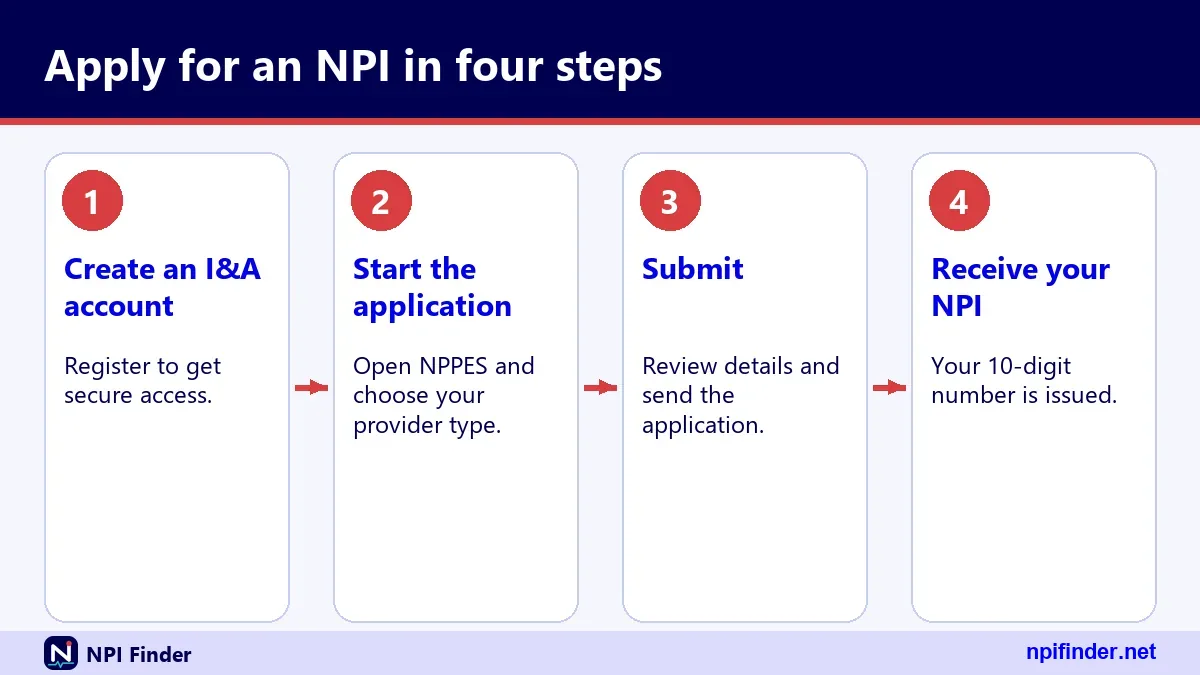
You get an NPI number by creating an account, filling in the NPPES application, submitting it, and then checking the registry for your record. The steps below are the shortest path for most people.
- Decide whether you need a Type 1 NPI (an individual) or a Type 2 NPI (an organization).
- Gather your legal name, tax ID, addresses, taxonomy code and license details.
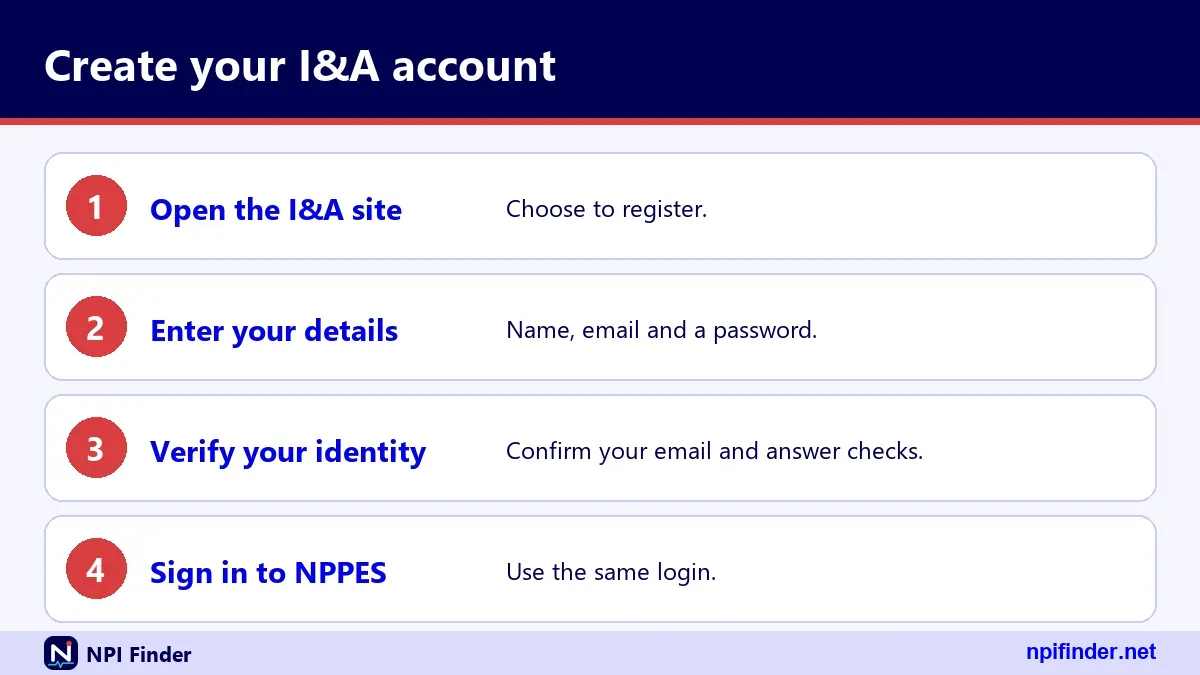
- Create your I&A (Identity and Access) account and start the NPPES web application.
- Submit, then search the NPI Registry to confirm your record is public.
Tip: Use the web application. CMS says the web route gives the most efficient processing and the fastest receipt of NPIs.
Apply for an NPI: who must, who may, and who cannot
Any health care provider as defined in 45 CFR 160.103 may apply for an NPI, and covered providers must have one. A covered provider is one who sends health information electronically in a HIPAA standard transaction, such as a claim. Non-covered providers may still apply. Entities that provide no health care, such as a transportation service, are not eligible.
National provider identification registration in plain terms
National provider identification registration is the formal name for the same NPPES application. The rule behind it sits in 45 CFR Part 162, Subpart D, and the National Provider System stores the data. In everyday speech people say "NPI sign up", "register for an NPI" or "get an NPI". All of those mean one thing: you are enumerated once and keep the number. For background on the number itself, read What Is an NPI Number?.
How do I get an NPI number if I have never used NPPES?
If you have never used NPPES, start by creating an I&A account, because the NPPES web application sits behind that login. You then pick your entity type and fill in the form. No earlier registration is needed. If the system says your Social Security number already matches an account, you already have an I&A or NPPES account, and you should recover it rather than make a second one.
New applicants often worry about doing it wrong. The process is forgiving if you prepare. Most of the work is collecting accurate details, not mastering software. Allow yourself one calm sitting, keep your documents open beside you, and read each screen before you move on.
NPI application: what the form collects
The NPI application collects who you are, where you practice, what you do and who can be contacted about the record. The paper form and the web application ask for the same core data. The table below is a checklist drawn from CMS-10114. The form text was only partly extractable, so treat it as the main items, not every field.
| Item | Individual (Type 1) | Organization (Type 2) |
|---|---|---|
| Entity type | Individual | Organization |
| Name | Your legal name | Legal business name |
| Tax identifier | SSN or ITIN | EIN |
| Date of birth | Required | Not applicable |
| Identity documents | If applicable, for example if born abroad | Not applicable |
| Mailing address and phone | Required | Required |
| Practice location and phone | Required | Required |
| Taxonomy code | Required | Required |
| License number and state | Where applicable | Where applicable |
| Authorized official | Not applicable | Required |
| Contact person | Required | Required |
Details for individual applicants
Individuals give their name, SSN or ITIN and date of birth, plus proof of identity where it applies. CMS says the SSN, ITIN and date of birth are not made available on the internet. Other submitted information may be public. Use the name you use professionally, because it will be searchable in the registry. Spelling matters here more than anywhere else. A misspelled surname makes you hard to find, and payers and patients search by name first. Check the spelling against your license before you submit.
Details for organization applicants
Organizations give a legal business name, an EIN and an authorized official. The authorized official is a person with authority to speak for the organization. After approval, that official's name, title and phone appear in the public record. Pick someone who is stable in the role, and tell them their details will be published.
The contact person section
The contact person is who CMS can reach about the application. This person need not be the provider. A billing manager or credentialing coordinator often fills the role. Use a mailbox that several people watch, so a single vacation does not stall a question from the enumerator.
Apply for NPI number: what to gather before you start
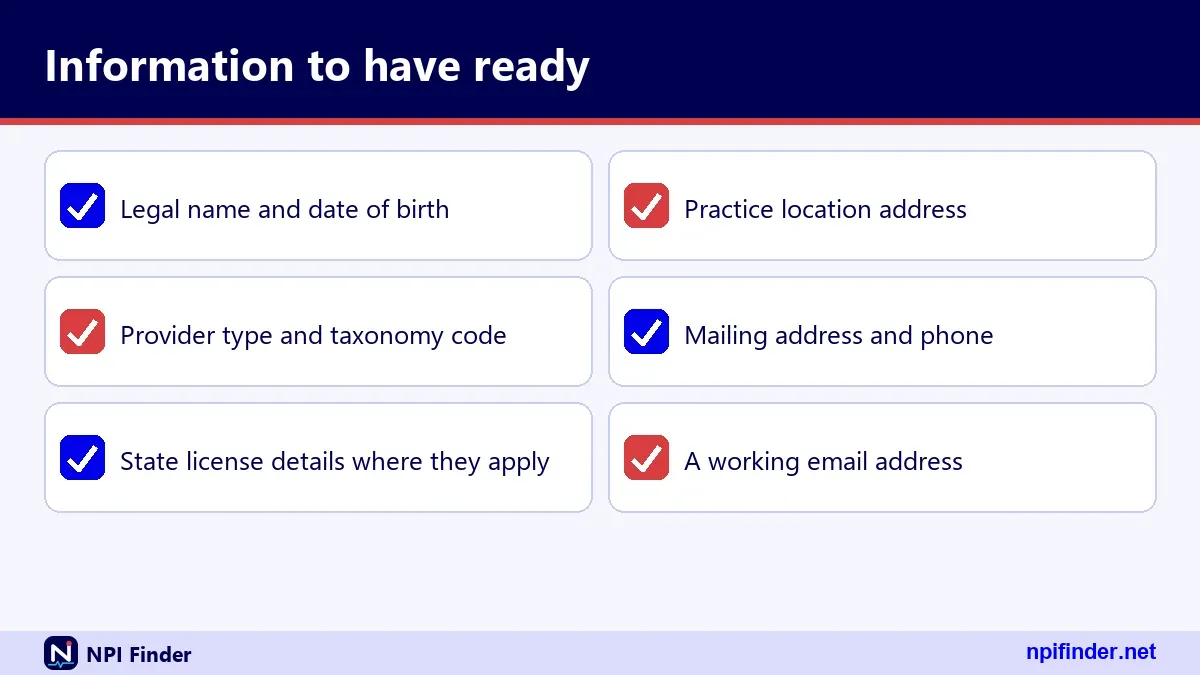
Before you apply for an NPI number, collect every item on the checklist in one folder. Half-typed data is how typos happen, and a short prep saves a long recovery later. Gather the following.
Identity and tax details
Have your SSN or ITIN ready if you are an individual, or your EIN if you are an organization. Check that the name matches your tax records. The IRS issues EINs free directly from the IRS, so you do not need a paid service for that step.
Practice and mailing addresses
Write down the business mailing address and the practice location, each with a phone number. NPPES stores them as separate address purposes, LOCATION and MAILING. Many providers use an office box for mailing. Do not assume the mailing address shows where you see patients.
License and taxonomy information
Note your taxonomy code, your license number and the issuing state. People in certain licensed professions must give license information or send a letter explaining why they have none. See the Taxonomy Code Lookup page to find the right code before you start.
How to apply for NPI number online through NPPES
You apply online by signing in to NPPES with an I&A account and completing the web application for your entity type. The numbered steps below show the order. Names of buttons may change, so follow the on-screen labels.
- Open the official NPPES site from the CMS pages and choose to sign in or create an account.
- Create or recover your I&A User ID and set up multi-factor authentication.
- Choose to apply for a new NPI and select Individual or Organization.
- Enter identity, address, taxonomy and license information.
- Review every screen, then submit.
- Save your confirmation and watch for notice of your NPI.
Warning: Type the official address yourself. Lookalike sites exist, and CMS lists no fee for an NPI.
Creating your I&A account
I&A is the single account system for NPPES, PECOS, PEPPER and CBR. Individual providers with an NPPES account can use the same User ID and password in I&A. Passwords expire every 60 days, which only blocks login. If you already have credentials, see NPPES Login Help.
Setting up multi-factor authentication
Multi-factor authentication has been required for I&A login since 04/21/2022. You need only one method, but setting up two, such as email and text message, is recommended. A voice call is also listed as an option. A second method is your backup when a phone is lost. You can also reset your methods by logging in to I&A, so a lost phone is a nuisance, not a lockout. Choose methods you can reach from the place where you normally work.
Saving proof that you applied
Keep your confirmation details, the date and the name of the person who applied. If something goes wrong later, that record speeds up a call to the help desk. Store it where your practice manager can also reach it.
NPI number application: choosing Type 1 or Type 2
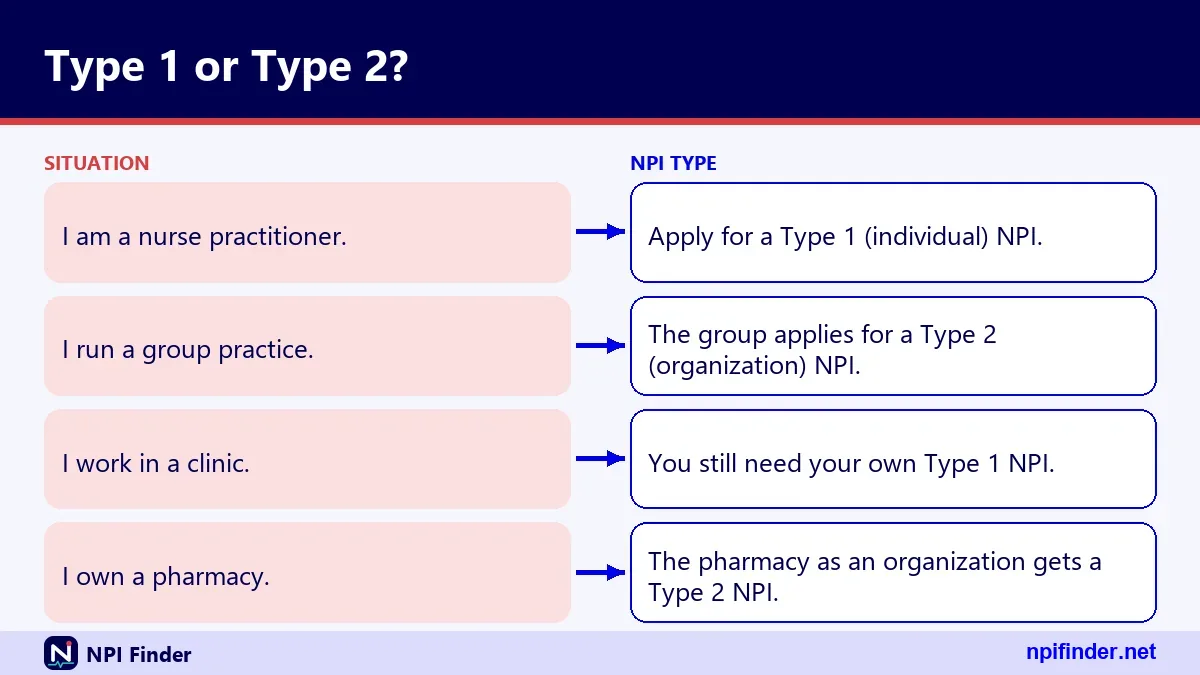
Choose Type 1 if you are a person and Type 2 if you are an organization. This is the first decision in any NPI number application, and a wrong choice costs time. Individuals are eligible for only one NPI. Organizations can hold several.
When you need a Type 1 NPI
Physicians, nurse practitioners, dentists and other individual health care providers get Type 1 numbers. A sole proprietorship is also Entity Type 1. In the registry data, the sole proprietor flag appears as YES or NO under the basic section of your record.
When you need a Type 2 NPI
Hospitals, nursing homes and physician groups get Type 2 numbers. The organization applies, and it names an authorized official. If your group bills under its own name and tax ID, it likely needs its own NPI-2 as well as an NPI-1 for each clinician.
Incorporated individuals who need both
An incorporated individual who is a health care provider can have a Type 1 NPI for themselves and a Type 2 NPI for the corporation or LLC. These are two separate applications. Keep the paperwork distinct so the right EIN sits on the right record.
Apply for an NPI number: taxonomy and license entries
You apply for an NPI number with at least one taxonomy code, which tells the registry your provider type and specialty. The NUCC Health Care Provider Taxonomy is the code set behind it. Version 26.1 took effect 7/1/26. Each code is ten characters long.
Picking your primary taxonomy
A record can hold up to 15 taxonomies, and one is marked primary. Choose the primary code that best matches what you actually bill under. For example, 207Q00000X is Family Medicine and 363L00000X is Nurse Practitioner. Browse more in the glossary section below.
Adding license numbers and states
Each taxonomy entry can carry a license number and a state. The registry displays both. Enter the license exactly as your board issues it. Remember that an NPI does not prove you are licensed. It only reports what you told NPPES.
NPPES shows its own short description for each code, such as Family Medicine. NUCC may show a longer display name, such as Family Medicine Physician. Both point to the same code. Do not worry if the words differ; the code is what counts.
Get an NPI number: addresses and phone numbers
To get an NPI number you give two kinds of address: a mailing address and a practice location. Both are public. The registry labels them with an address purpose, so searchers can tell which is which. Plan which phone number you want strangers to find before you type it.
Mailing address choices
The mailing address is where you receive mail about the record. Many providers use an office or a box. The registry shows it in upper case. A 9-digit ZIP code is stored without the hyphen. Use an address where mail is actually opened.
Practice location and extra locations
Your main practice location goes in the location slot. Secondary sites go in the practice locations list, each with its own address and phone. A sample record for an internist shows three extra locations in three jurisdictions. Add only places where you see patients. Each secondary site carries its own address, phone and, when relevant, fax. Leave out places you merely visit once, because every extra entry becomes one more line you must keep current.
Patients and plans use the phone number to reach you. A fax number appears in the record when you provide one. Enter a number a front desk answers rather than a personal cell phone.
NPI number registration: what happens after you submit
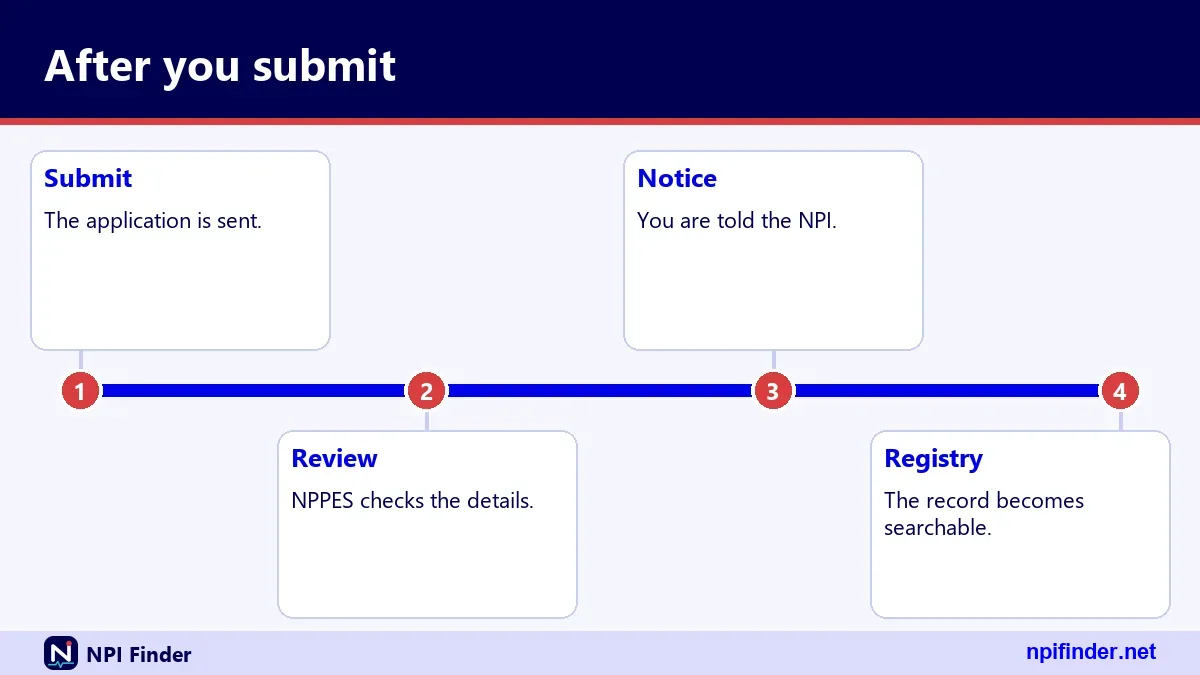
After you submit, the NPI Enumerator processes your application and notifies you of your NPI. CMS has not published a processing time, so no honest figure exists. The web route is the faster one by CMS's own account. Your record then appears in the NPI Registry, which is updated daily.
How you learn your number
CMS says the enumerator notifies applicants of their NPI. If the notice goes missing, you can search the registry by name and state. Search by name and state, and read the full record.
If the enumerator needs more information, you may be contacted through the contact person on file. Answer quickly. Keep your phone number and email current in the application so questions reach someone who can respond.
Your record carries an enumeration date, a certification date and a last updated date. The enumeration date is when the NPI was issued. The other two change when you certify or edit the record. Billing staff sometimes ask for these dates during credentialing.
NPI registration: what the public record shows
Once approved, your NPI registration is public, and the registry returns it as one record with several sections. The hero tool on this site shows the same parts: basic, addresses, practiceLocations, taxonomies, identifiers, other_names, endpoints and the raw JSON. Think about each before you submit.

The basic section
For an individual, basic holds name, credential, sex, sole proprietor flag, enumeration date, last updated date, certification date and status, where A means active. For an organization it holds the organization name, subpart flag and authorized official details. Dates are shown in a year-month-day format.
Addresses and practice locations
The addresses list holds your location and mailing entries. The practiceLocations list holds extra sites. Each entry has street lines, city, state, ZIP, country, phone and address type, such as DOM for domestic. These fields are what people use to find you by state.
Taxonomies, identifiers, other names and endpoints
Taxonomies list codes, descriptions, license and state. Identifiers hold other issued IDs. Other names show former names or a Doing Business As. Endpoints hold electronic addresses for exchanging health information. Many records have empty identifiers and endpoints, and that is normal. You do not have to fill them to get your number. Add them later only if a payer or exchange partner asks. Reviewing each section after approval tells you exactly what strangers can see.
NPI application timeline: the order of events
The NPI application timeline has a clear order but no official turnaround figure. CMS does not publish a number of days, so the table lists stages, not dates. Use it to plan the work around your start date.
| Stage | What happens | Timing |
|---|---|---|
| Prepare | Gather IDs, addresses, taxonomy and license data | Before you start |
| Account | Create I&A account and set up multi-factor authentication | Before the application |
| Apply | Complete and submit the NPPES web application | One sitting if prepared |
| Processing | The enumerator reviews and issues your NPI | No official figure published |
| Confirm | Find your record in the NPI Registry | After you receive notice |
| Maintain | Report changes to NPPES data | Within 30 days of the change |
| Enroll | Medicare enrollment in PECOS, if you bill Medicare | Separate process |
Starting early before a hire date
Apply as soon as you know you will need the number. Credentialing and payer enrollment ask for it, and neither can finish without it. Do not wait for your first claim to start the work.
Planning around Medicare enrollment
An NPI is required for Medicare enrollment but does not replace it. NPPES updates also do not update your Medicare record. Plan two tracks from day one, and read PECOS Lookup and Revalidation when you reach the second.
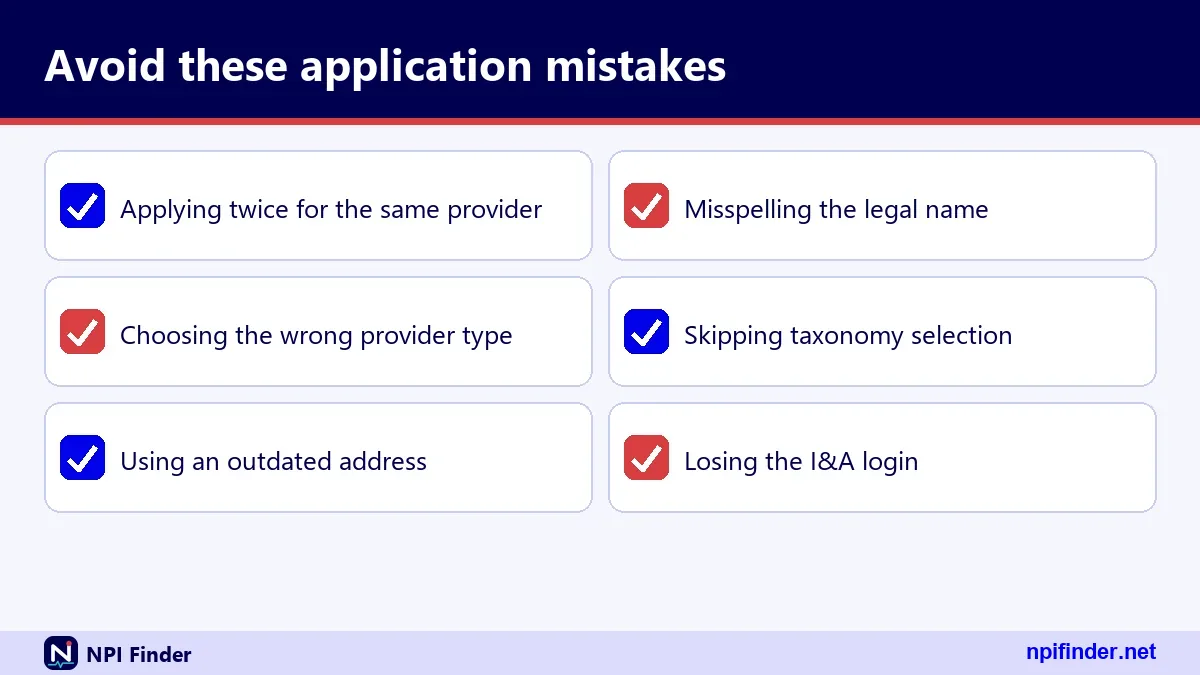
While you wait, finish what does not need the number: tax setup, licenses, payer paperwork. Check the registry from time to time. Do not file a second application, because health plans cannot require an additional NPI and duplicates cause confusion.
How to apply for NPI: web, paper or bulk file compared
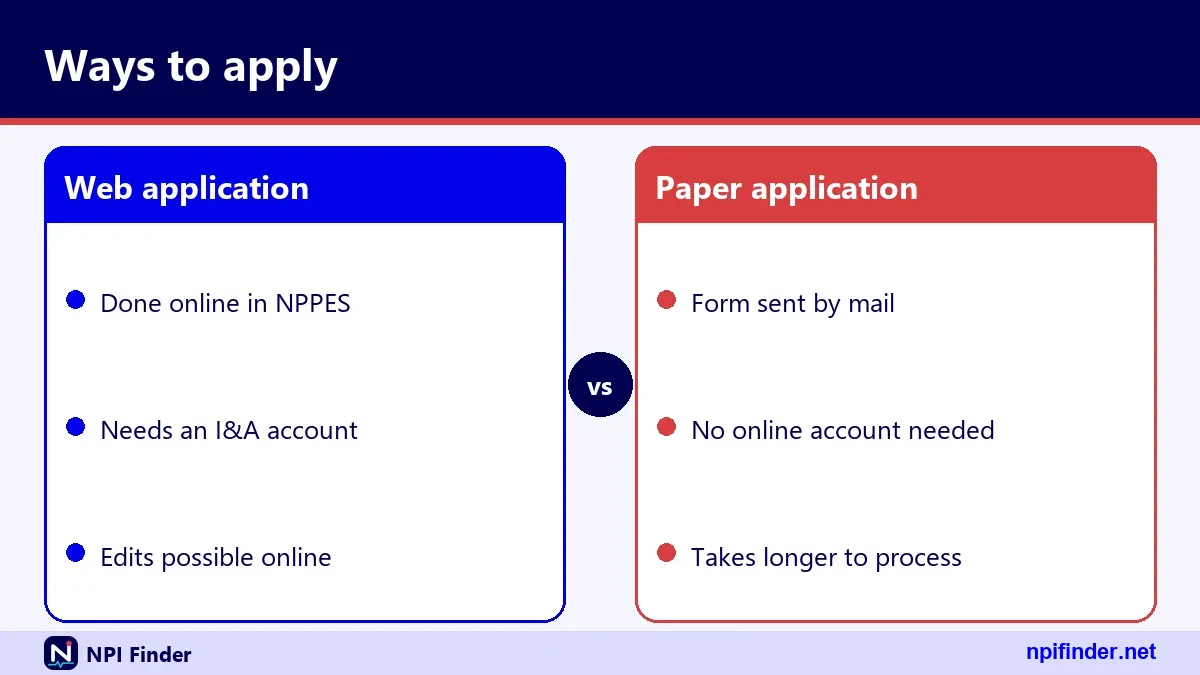
CMS offers three ways to apply for an NPI: the web-based NPPES application, the paper form CMS-10114, and Electronic File Interchange for bulk enumeration. The web route is the one CMS recommends. The table shows how they differ.
| Method | Who it suits | How it works | CMS view |
|---|---|---|---|
| Web application | Nearly everyone | Sign in with I&A and complete the online form | Most efficient, fastest receipt |
| Paper form CMS-10114 | Applicants who cannot use the web | Complete, sign and mail to the NPI Enumerator | Slower than web |
| Electronic File Interchange | Organizations enumerating many providers | Authorized organization submits a bulk file | Authorized organizations only |
So, the web application is the best method for nearly every applicant because CMS states it gives the fastest receipt of NPIs.
Why the web route usually wins
Online, the system checks your entries as you go and you skip the mail. CMS states that the web process gives the fastest receipt of NPIs. You also get a clean path to later updates, because the same I&A login handles them.
When paper still makes sense
Paper works if you cannot get online or must send supporting documents. You mail the form to the enumerator and wait. Expect a slower result. If you pick paper, double-check every box and signature before you seal the envelope. Photocopy the finished form for your records, and send it by a method that gives you proof of delivery.
When bulk enumeration applies
Bulk enumeration is for authorized organizations that enroll many providers at once, such as a large health system. An individual doctor does not use it. If your employer says it will handle the NPI, ask whether it uses this route.
NPI application online: a review routine before you submit
Before you submit an NPI application online, run a short review so the record is right the first time. Fixing it afterward is possible, but it burns time and creates a public history. Use this routine.
- Compare your name with your license and tax records, letter by letter.
- Confirm the entity type matches who is applying.
- Check each address and phone number for typos.
- Confirm the primary taxonomy and the license number and state.
- Read the contact person details aloud to a colleague.
Tip: Do this review with a second person. A fresh pair of eyes catches a transposed digit that you have stopped seeing.
Spelling and name format
Use your professional name. Registry data is stored in upper case, so capitalization is not a concern, but spelling is. Suffixes and credentials go in their own fields. Do not stuff titles into the name boxes.
Address formatting
Write street lines the way the postal service does. Use a two-letter state code. Enter five-digit ZIP codes or the full nine digits. The registry returns nine-digit codes without a hyphen, so do not be surprised by that.
Contact and authorized official check
Confirm the contact person is reachable and the authorized official knows their name will be published. Organizations often forget this. A short email beforehand avoids an awkward surprise.
Paper NPI application with form CMS-10114
The paper route uses form CMS-10114, titled National Provider Identifier Application/Update Form. The revision on the CMS site is dated 02/25, and the OMB number is 0938-0931. Use only the current form from CMS, not an old copy from a drawer.
- Get the current form from CMS, or ask the NPI Enumerator to send one.
- Check one reason for submittal: Initial Application.
- Complete the sections for your entity type, including taxonomy and license data.
- Sign the form and attach anything the instructions require.
- Mail it to CMS NPI Enumerator Services, Mail Stop DO-01-51, 7500 Security Blvd., Baltimore, MD 21244.
Warning: Confirm the mailing address in the form instructions before you send. The form instructions are the authority on where to send it, and addresses can change.
One reason and one NPI per form
The form allows one reason for submittal and one NPI per form. The reasons are Initial Application, Change of Information, Deactivation and Reactivation. Do not tick two boxes. Send separate forms for separate actions.
Licensed professions and the letter
Individuals in certain licensed professions must give license information or send a letter explaining why none exists. Do not leave the section blank without the letter.
What CMS says about privacy on the form
The form states that SSN, ITIN and date of birth are not made available on the internet. Other submitted information may be. Read that line before you mail anything, and decide what you are comfortable seeing in a public database.
Electronic File Interchange and bulk enumeration
Electronic File Interchange, or EFI, lets an authorized organization submit NPI applications for many providers in a file. CMS names it as the third route to an NPI. The detailed rules for becoming an authorized submitter are not covered here, because that process is not in the verified CMS material used for this page.
Who uses EFI
Large employers, hospital systems and credentialing organizations are the likely users. If you work in one, your compliance team will know. A solo practitioner should ignore this route.
What you should ask your organization
Ask who submitted your application, what contact details they entered and whether you can see the confirmation. You are the provider, and the record describes you. Insist on seeing it.
After a bulk submission, search the registry for your own name and read every field. Errors in a bulk file repeat across many people. Report problems through the NPPES update process.
Requesting a paper NPI application by phone or mail
You can request a paper application from the NPI Enumerator by phone, at 1-800-465-3203, or by writing to the enumerator's Baltimore address. TTY users call 1-800-692-2326. CMS does not list hours on the pages used for this guide, so call during a normal business day and be ready to wait.
Phone requests
State clearly that you want the form for a new NPI. Give a mailing address that you check. Write down the date and the name of the person you spoke with, in case you need to call back.
The enumerator also lists the email address [email protected] and the same Baltimore mailing address used for paper applications. Do not send your SSN in an email. Ask for the form, not a status on a case, and keep the message short.
Help desk versus enumerator
The NPI Enumerator handles NPPES applications. The External User Services help desk handles I&A account problems for NPPES, PECOS and related systems. Their number is 1-866-484-8049. Calling the wrong one wastes a day.
NPI sign up for a new practice: order of operations
If you are launching a practice, the right order saves you from circular delays. The NPI comes early, but Medicare and payer enrollment follow it. Plan the sequence below.
- Get your Type 1 NPI as an individual, if you do not already have one.
- Obtain an EIN from the IRS if the practice is an entity, which is free directly from the IRS.
- Apply for a Type 2 NPI for the practice, naming an authorized official.
- Update taxonomy and addresses so every record matches.
- Start Medicare enrollment in PECOS if you bill Medicare, and payer enrollment elsewhere.
Tip: Use identical legal names and addresses in every application. Mismatches between the EIN, NPPES and enrollment records are a common reason credentialing slows down.
Solo practice with no entity
A sole proprietor is Entity Type 1. You need only your own NPI. You do not need a Type 2 NPI unless you form an organization that bills separately. Do not create entities you do not have.
Group practice or LLC
Groups and LLCs apply for Type 2 NPIs. Each clinician in the group keeps a personal Type 1 NPI. The group NPI identifies the organization on claims where an organization is billed.
New location of an existing practice
A new office may need a practice location entry on existing records, or a separate subpart NPI if it truly has unique identifying data. The rules for subparts are in the variants section below. Update NPPES within 30 days of a change.
NPI application update form: change, deactivation and reactivation
The same CMS-10114 form that starts an NPI also changes, deactivates and reactivates one. The form offers four reasons for submittal: Initial Application, Change of Information, Deactivation and Reactivation. Online, updating runs through NPPES after you log in with your I&A account.
Reporting changes
Covered providers must report changes to required NPPES data within 30 days. An address move is the classic example. This section only places the update process in the application story.
Deactivation reasons on the form
Deactivation on paper lists three reasons: death, business dissolved and other. A deactivated NPI is never reassigned to another provider. Details of the online deactivation screens are not verified for this page, so check NPPES directly.
Reactivation uses its own box on the paper form and needs a reason. CMS does not state a processing time. If you were deactivated by mistake, say so plainly in the reason and keep a copy of what you send.
How to get a group NPI number
A group NPI is a Type 2 NPI issued to an organization such as a physician group, clinic or hospital. The organization applies through NPPES, names an authorized official and lists its own taxonomy and addresses. It is a separate record from the NPI of any clinician in the group.
Group NPI versus individual NPIs
Each clinician keeps a personal Type 1 NPI. The group's Type 2 NPI identifies the business. Do not apply for a Type 1 NPI in the group's name. Organizations can hold several Type 2 NPIs when they have distinct parts.
The person filing needs authority to speak for the organization. Often that is the practice administrator or an owner. If you are a new clinician joining a group, you normally apply only for your own Type 1 NPI.
Type 2 NPI application: the authorized official and the EIN
A Type 2 NPI application needs a legal business name, an EIN and an authorized official. Apply for type 2 NPI only after your business exists and your tax ID is settled. Otherwise you will edit the record almost immediately.
Getting the EIN first
The IRS issues EINs free directly from the IRS. You can apply online, by fax with Form SS-4, or by mail. Third-party services that charge for this step are not the IRS. Finish the EIN before the NPI so the numbers match.
Naming the authorized official
The authorized official's name, title and phone number appear in the public record for organizations. Choose someone who will remain with the business. When that person leaves, update NPPES within 30 days.
Sole proprietors and incorporated clinicians
A sole proprietor is an Entity Type 1 and needs only an individual NPI. A clinician who incorporates may need two numbers. The rule is simple once you see it: people get Type 1, businesses get Type 2.
The sole proprietor flag
The registry shows a sole proprietor flag of YES or NO in the basic section. It describes your business form. It does not change which NPI type you get. Answer it truthfully, because it is public.
Incorporated clinicians with one entity
If you practice through a corporation or LLC that bills under its own name, it can have a Type 2 NPI, and you keep your Type 1. Ask your accountant which entity bills. Then match each NPI to its tax ID.
Do registered nurses have NPI numbers?
Registered nurses may have NPIs if they meet the definition of a health care provider, but not every RN needs one. Nurse practitioners and certified registered nurse anesthetists clearly appear in the NUCC code list, with codes such as 363L00000X and 367500000X. A staff RN who never bills should ask the employer first.
Nurse practitioners, PAs and CRNAs
These advanced practice clinicians commonly bill under their own names and therefore use their own NPIs. Their taxonomy codes sit in the Physician Assistants and Advanced Practice Nursing Providers grouping. Apply as a Type 1 provider.
Staff nurses and other clinical staff
Whether you need one depends on your role and your employer. A provider who is not covered may still obtain an NPI, but is not required to. Ask your credentialing office before applying on your own.
Can you apply for an NPI number without a license?
Whether you can apply without a license depends on your profession. The form expects license information from people in certain licensed professions. Those applicants must provide it or send a letter explaining why they have none. Silence is not an option.
Professions with no license
Some roles are not licensed at all. In that case, CMS's form route is the explanatory letter. Say plainly what you do and why no license exists. Keep it short and factual.
If your license is still pending, the CMS material behind this page does not say how to handle it. Call the NPI Enumerator before you apply, and ask how to handle a pending number.
Do medical students and residents need an NPI?
No, not always. Medical students, interns, residents and fellows are health care providers, so they may apply for an NPI. CMS says they are not "covered" providers unless they send electronic health data in a HIPAA standard transaction. Then the NPI is not required.
Many programs ask residents to get one anyway, so check with your program office before you apply. CMS says unlicensed students, interns and residents should use the Student, Health Care taxonomy, code 390200000X. You can confirm it in the Taxonomy Code Lookup.
Hospital units, branches and other subparts
A subpart is a component of an organization health care provider, such as a hospital unit, and it can receive its own NPI. The condition is that the subpart's identifying data are unique. The concept does not apply to individuals.
Who decides which subparts need NPIs
The covered organization decides. It must either obtain NPIs for subparts that need them or require those subparts to obtain their own. A written decision file helps during audits and payer reviews. Record which units you gave numbers to, why their identifying data are unique and who approved it. Revisit the file whenever the organization restructures.
Reading the subpart flag in the registry
Organization records carry an organizational subpart flag with YES or NO, and may list a parent organization. This tells searchers whether a record is a stand-alone entity or part of a bigger one.
How to get an NPI number in California and other states
You get an NPI the same way in every state, because the NPI is a federal identifier issued by CMS and not by a state. California applicants use NPPES like everyone else. The state shows up only in your addresses and your license entries.
State license versus federal NPI
Your state board issues your license. CMS issues your NPI. Neither replaces the other. The registry displays the license state beside each taxonomy, which is how searchers connect the two. Browsing records by state shows how this looks in practice.
You still have one Type 1 NPI. Add each practice location and each license state to your record. A sample internist record lists locations in three jurisdictions and licenses in three states under a single number.
Which NPI application route should you choose?
Choose the web application unless you cannot use it. That is the short version of the whole comparison. CMS recommends web for efficient processing, paper is a fallback, and bulk is for authorized organizations.
Ask three questions. Can you reach the internet and receive email? Then use web. Do you lack access or need to mail documents? Then use paper. Do you enroll many providers for an employer? Then ask about bulk.
Type 1 versus Type 2 at a glance
Type 1 is for individuals and Type 2 is for organizations, and the two differ in eligibility, quantity and data. The table puts the contrasts side by side.

| Feature | Type 1 (NPI-1) | Type 2 (NPI-2) |
|---|---|---|
| Who | Individual health care providers | Organizations |
| Examples | Physicians, nurse practitioners, sole proprietors | Hospitals, nursing homes, physician groups |
| How many allowed | One per individual | Several allowed |
| Tax ID on application | SSN or ITIN | EIN |
| Authorized official | No | Yes |
| Subparts | Not applicable | Possible |
NPI, PTAN and Medicare enrollment: what you still need
An NPI alone does not let you bill Medicare. You also need Medicare enrollment, and the MAC issues the PTAN, the Medicare billing identifier, when that enrollment is processed. The NPI does not validate a license, guarantee payment or enroll you in any health plan.
How to get a PTAN number
You get a PTAN through Medicare enrollment, not through NPPES. Enroll online in PECOS or by paper application, then the Medicare Administrative Contractor assigns it. Search phrases like "how to get a Medicare provider number" point to this process. See PECOS Login for access help.
Do not confuse the NPI with other numbers
The NPI is separate from the PTAN, CCN, DEA number, state license number and Medicaid ID. Each has its own issuer. A DEA number comes from the DEA, not from NPPES. The NPI vs Other Provider IDs page lays out the full set.
Free NPI lookup and registry search after you apply
The NPI Registry is free to search, and CMS states there is no charge to view its data. Use it after you apply to confirm your record. People also type "national register of health service providers" or "national health register", but the matching US tool is the NPI Registry.
Registry search for your own record
Search by name and state, or by your NPI number, and read each field. A 10-digit number must be exactly ten digits, or the registry returns an error. Do this check within days of approval.
Searching organizations, such as retail pharmacies or optical shops
Retail chains and clinics are organization records. Search the organization name, with at least two leading characters before any wildcard. Do not guess a number from a store website. See Find a Medicare Provider when you want enrollment context.
Search by specialty or state
If you want to find colleagues rather than yourself, use NPI Lookup by Specialty. Searches by taxonomy description accept an exact description or a wildcard after two characters. Results are capped, so narrow by state or city.
Login and account problems during NPI registration
Most registration delays come from I&A account trouble, not from the NPI form itself. The I&A FAQ covers the usual cases: forgotten passwords, forgotten User IDs, locked accounts and dormant accounts. Fix the account first, then return to the application.
Forgotten password or locked account
Use Forgot Password on the I&A Sign In page. You answer three security questions or give the user information tied to the account. Three failed logins lock the account, and Forgot Password unlocks it. After three failed attempts at user information, call the help desk.
Use Retrieve Forgotten User ID on the sign-in page. It needs a unique email on the account or other user information. An account unused for 180 days needs a password reset. After 365 days you must re-verify and create a new User ID.
Your new NPI does not show up in the registry
If your new NPI does not appear, first check that you typed the number or name correctly, because the registry does exact matching. A name search with a one-letter slip returns nothing. A last name such as "sm" with no wildcard is an exact match, not a partial one.
Search mistakes that hide your record
Wildcards need at least two leading characters and only work at the end of a word. State cannot be your only search criterion. A number must be ten digits. Try one clean search before you assume the record is missing.
If you have your confirmation and still see nothing after a reasonable wait, contact the NPI Enumerator at 1-800-465-3203. Have your application date and details ready. The Find My NPI Number page shows safe ways to search.
You already have an NPI, or you applied twice
An individual is eligible for only one NPI, so a second application for the same person is a mistake. If you think you applied before, search the registry by name and state first. An account matching your SSN also tells you that you already have an I&A or NPPES account.
Do not create a duplicate
Health plans may not require a provider with an NPI to get an additional one. If a payer asks for a "new" number, you probably need to share the one you have. Explain that NPIs are lifelong for the provider.
Sign in to NPPES with your I&A account, or search the registry. The NPI Enumerator also notifies applicants of their NPI. The official step-by-step process for recovery is not verified for this page, so use the routes above.
Wrong information after approval
If the registry shows wrong information after approval, correct it through NPPES rather than reapplying. Covered providers must report changes within 30 days. That rule is in 45 CFR 162.410. The registry is not a credential check, so it only repeats what you reported.
How to fix an address or taxonomy error
Log in to NPPES with your I&A account and edit the affected section. Or file the paper form with Change of Information checked. Use the Update or Deactivate an NPI guide for deeper detail.
An NPPES edit does not update your Medicare enrollment. You must update PECOS separately. Make a habit of editing both on the same day, so billing records and the public registry tell the same story.
Scams and sites that charge for an NPI
Any site that charges you for an NPI or for a registry lookup is not CMS. CMS lists no fee to get an NPI, to use the registry or to download the data files. The official application lives on the NPPES site run by CMS.
Red flags to watch for
Be wary of pages that ask for payment before showing a form, promise a guaranteed number or hide the CMS name. No current CMS fraud alert specifically about NPI-for-fee sites was found, so do not claim one exists. Simply do not pay.
Type the address yourself or follow it from a CMS page. Never send your SSN by email. Check that the page asks you to sign in through the I&A system. If in doubt, call the NPI Enumerator.
The law behind NPI registration: HIPAA and 45 CFR Part 162
The NPI exists because HIPAA required a standard unique health identifier for providers, and the final rule was published on 23 Jan 2004. The rule is codified at 45 CFR Part 162, Subpart D. It became effective May 23, 2005, and providers could apply from that date.
Compliance dates and duties
Covered providers had to use NPIs by May 23, 2007. Small health plans had until May 23, 2008. Under 162.410(a), covered providers obtain an NPI, use it in standard transactions, disclose it on request, report changes within 30 days and make sure business associates use it correctly.
Organizations must require their non-covered prescribers to get an NPI and disclose it when prescribing within their role. This is in 45 CFR 162.410(b). CMS says non-covered prescribers need NPIs but are not required to get them personally.
What CMS charges: the cost of getting an NPI
CMS lists no fee for getting an NPI. It also states that there is no charge to view NPI Registry data or to download the data files. A 2006 CMS message said applying online is free, and no current CMS page lists a fee, so confirm on the official site when you apply.
Costs you may still meet
An EIN is free from the IRS. Your own time, staff time and any consultant you hire are real costs. A consultant is optional, because the application is something most providers can do themselves. If you do hire help, ask what exactly you are paying for, and make sure you remain the account holder. Never share your I&A password with anyone, including a helpful vendor.
Privacy: what NPPES makes public
CMS publishes NPI Registry data because it is required to be disclosed under the Freedom of Information Act. Public fields include name, credential, addresses, phone and fax numbers, taxonomies, license numbers and states, other names, practice locations and endpoints. For organizations the authorized official's name, title and phone also appear.
What stays private
SSN, ITIN and date of birth are not made available on the internet, according to form CMS-10114. For deactivated NPIs, CMS discloses only the NPI and the deactivation date. Whether EINs appear in the API is not verified.
Official sources and who to call
Use the CMS pages, the NPPES site and the help desks for authoritative answers. The NPI Enumerator handles applications at 1-800-465-3203. The External User Services help desk handles account problems at 1-866-484-8049, with TTY at 1-866-523-4759. Hours are not listed in the sources used here.
Which office for which problem
Application status or form questions go to the enumerator. Login, password and multi-factor problems go to the help desk. Medicare enrollment questions go to your Medicare Administrative Contractor. Pick the right one first. Before any call, write down your NPI or application date, your name as entered and the exact message you saw. Support staff solve problems faster when you give them specifics. Note the date and the name of whoever helped you.
CMS offers monthly full replacement and weekly incremental NPPES files and states there is no help desk for using them. For bulk data, see NPI Database and Download.
Taxonomy codes explained for applicants
A taxonomy code is a ten-character NUCC code that names your provider type and specialty, and every NPI application needs at least one. The codes have three levels: provider grouping, classification and area of specialization. Version 26.1 contains 883 codes. The table lists a few common ones with exact NUCC display names.
| Code | NUCC display name | Section |
|---|---|---|
| 207Q00000X | Family Medicine Physician | Individual |
| 207R00000X | Internal Medicine Physician | Individual |
| 208000000X | Pediatrics Physician | Individual |
| 363L00000X | Nurse Practitioner | Individual |
| 363A00000X | Physician Assistant | Individual |
| 122300000X | Dentist | Individual |
| 183500000X | Pharmacist | Individual |
| 333600000X | Pharmacy | Non-Individual |
| 282N00000X | General Acute Care Hospital | Non-Individual |
A curated list, not a ranking
This table is a hand-picked sample. No official ranking of the most used codes was found, so it makes no claim about popularity. Use the full NUCC list for your real choice. NUCC releases new versions twice a year, on 1 January and 1 July, so check that the code you pick is current. Commercial reuse of the code set needs a NUCC licence, but using a code on an application is fine.
Pick the code that matches how you bill and how you want to be found. A cardiologist uses an Internal Medicine specialization, for example 207RC0000X. A general code works if you have no subspecialty. Revisit the choice when your practice changes.
The NPI check digit and validating your new number
Every NPI ends in a check digit calculated with the Luhn formula, so a typo usually breaks validity. CMS calculates it as if the prefix 80840 were present. When you use the number without the prefix, the shortcut is to add the constant 24 in step two of the calculation.
A worked example
CMS publishes an example using the nine-digit identifier 123456789, which yields check digit 3 and the format-valid number 1234567893. That number is not registered to anyone. It shows the math, nothing more. Test your own number with the NPI Number Validator.
What passing the check does not prove
A valid check digit only proves the number is well formed. It does not prove the number is assigned, active or licensed. Changing the last digit of a real, registered number to a wrong one produces a number that fails and returns no results.
Glossary of NPI application terms
These terms appear throughout the NPPES application and in CMS guidance. Knowing them removes most confusion on the form.
| Term | Meaning |
|---|---|
| NPPES | CMS system that assigns and stores NPIs |
| NPI Enumerator | CMS contractor team that processes applications |
| I&A | Identity and Access account used to sign in |
| Type 1 / Type 2 | Individual / organization NPI |
| Subpart | Component of an organization with its own NPI |
| Taxonomy code | NUCC code for provider type and specialty |
| Enumeration date | Date the NPI was issued |
| CMS-10114 | Paper NPI application and update form |
| PECOS | Medicare enrollment system |
| PTAN | Medicare billing identifier issued at enrollment |
"Registry" and "registration" are different things. Registration is applying. The registry is the public search tool. People also type "registery" and "registeration", but the official names are NPI Registry and NPPES registration. The NPPES Explained page covers the system itself.
Myths versus facts about NPI registration
Several myths about NPI registration cost providers time and money. The table sets the common ones against what CMS says.
| Myth | Fact |
|---|---|
| An NPI proves I am licensed | An NPI does not ensure or validate licensure or credentialing |
| An NPI enrolls me in Medicare | Medicare enrollment is a separate process |
| I must pay to apply | CMS lists no fee to get an NPI |
| My NPI expires | The assigned NPI does not expire |
| A new job needs a new NPI | Individuals are eligible for one NPI |
| My NPI shows my state | An NPI carries no embedded information |
By rule, the NPI has no embedded intelligence. The ten digits say nothing about state, specialty or age of the number. Location and specialty live in the record, not the digits.
Tips for a clean NPI application
These tips come from the way NPPES, CMS and I&A actually work, and they prevent the most common stalls.
- Prepare first: Collect identity, tax, address, taxonomy and license data before you sign in.
- Use the web route: CMS says web gives the fastest receipt of NPIs.
- Match everything: Keep names and addresses identical across NPPES, IRS and enrollment records.
- Set up two MFA methods: One is required, but a backup saves you after a lost phone.
- Pick a stable contact: Use a shared mailbox, not one person's inbox.
- Choose the primary taxonomy deliberately: It is the first thing searchers see.
- Mind the 30-day rule: Report changes to NPPES data within 30 days.
- Update PECOS too: NPPES changes do not flow to Medicare enrollment.
- Save your confirmation: Store it with your credentialing file.
- Never pay for an NPI: CMS lists no fee for the number or the registry.
After you get your NPI: a next-steps checklist
Once the number arrives, a few follow-up tasks make it useful. Work through them in order.
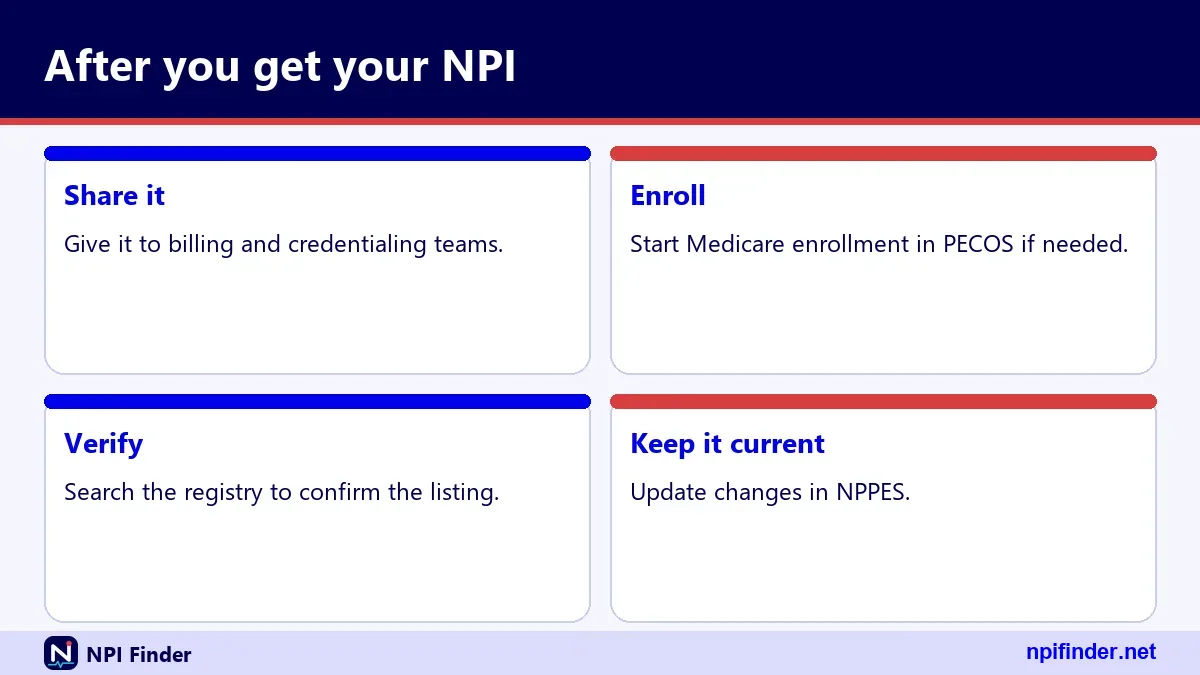
- Search the registry and read every field of your record.
- Give your NPI to employers, payers and billing staff.
- Start Medicare enrollment in PECOS if you bill Medicare.
- Add the NPI to your credentialing profile and claims.
- Put a reminder in your calendar to review the record regularly.
Tip: Review your record at least when you move, change names, add a site or change specialty. The 30-day clock starts at the change.
Your NPI is public and safe to share. Your SSN is not. Give the NPI to anyone who needs it for billing or referrals, and never send the tax ID unless the request is verified.
For more on the system you just used, see the Home page, which links to every guide on this site. If you also bill Medicare, plan the revalidation cycle: providers and suppliers revalidate every five years.
Recommendation
Apply through the NPPES web application, with an I&A account and two multi-factor methods already set up. Use identical names and addresses everywhere, save your confirmation and search the registry to verify the result. Avoid any site that charges a fee. Then start Medicare enrollment in PECOS if it applies to you.